TL;DR
- Preferred Sources lets a reader bookmark sites they trust, so those sites show up more for that one reader in Top Stories, AI Mode, and AI Overviews. It’s personal. It doesn’t move public rankings.
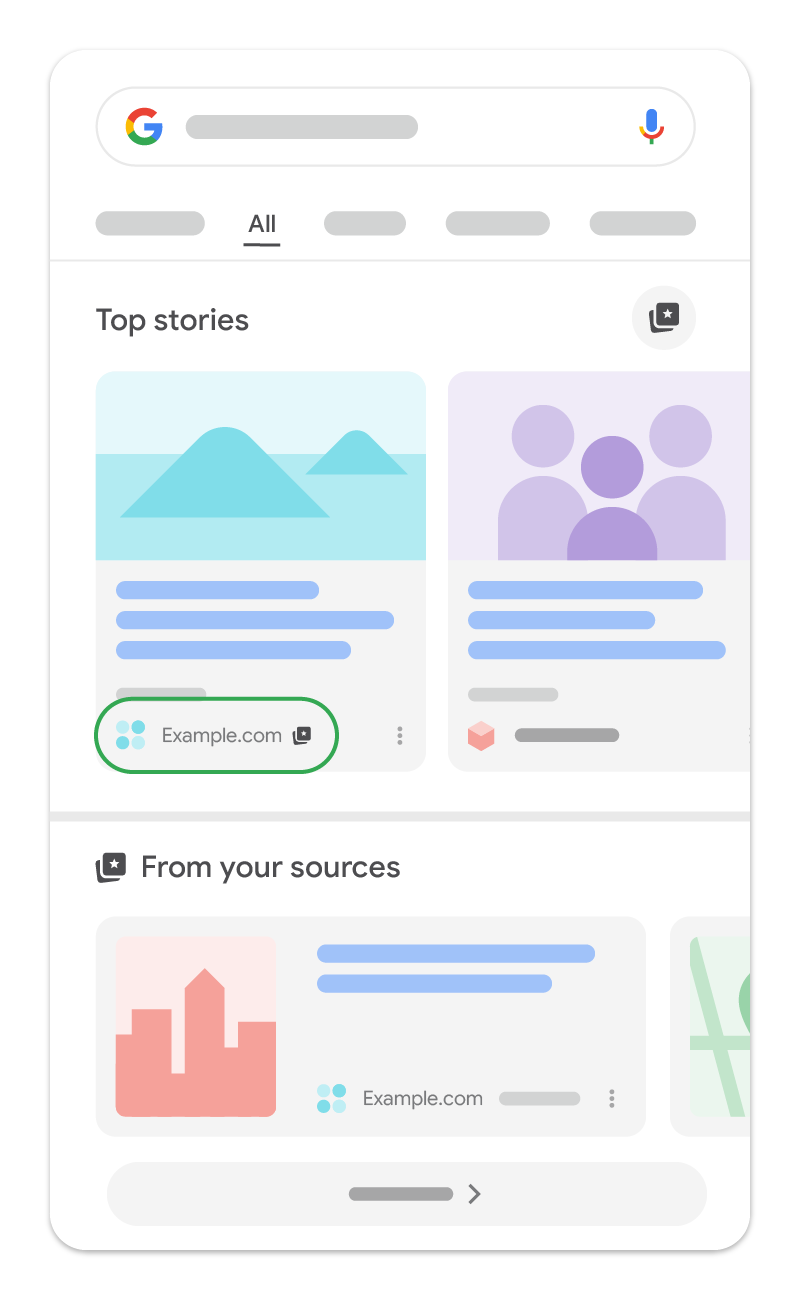
- Two ways to add a site: click the star icon next to the Top Stories header on any results page, or go to Search personalization → Source preferences from your Google profile menu.
- The feature launched in August 2025 for Top Stories (news only). Google expanded eligibility to non-news sites through 2026 and added an embeddable “Preferred Source” button for publishers in August 2026.
- As of this writing, Preferred Sources is live only in the US and India, in English. If you’re outside those markets, the setup steps below still apply once it rolls out to you, but you won’t see the feature yet.
- Publishers can add their own button using two lines of code from Google’s own script, or a plain link if they can’t touch their site’s <head>. Both are below, straight from Google’s developer docs.
You add a site as a preferred source on Google:
- either by clicking the star icon next to the “Top Stories” header on a search results page.
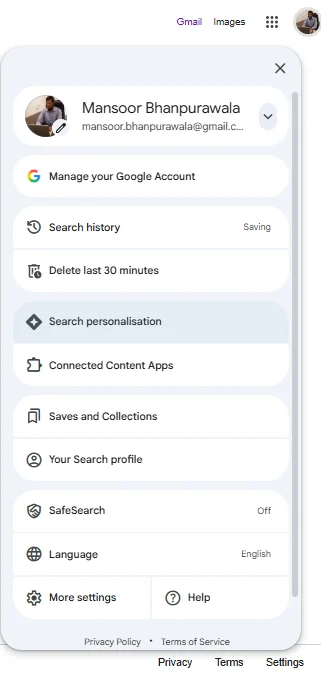
2. By going to your Google profile picture → Search personalization → Source preferences.
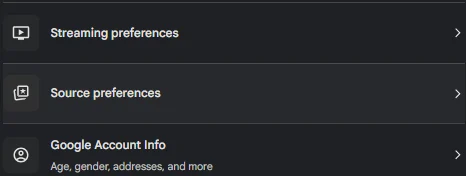
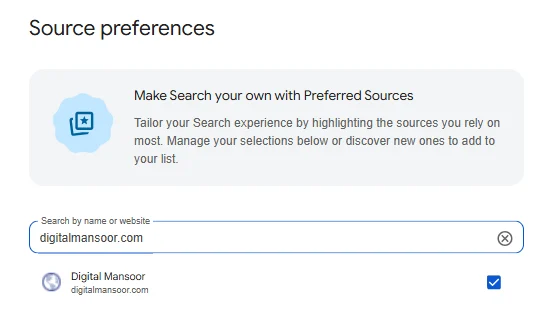
Adding a site as a preferred source tells Google to favor that domain in your personal Top Stories, AI Mode, and AI Overviews results whenever it publishes something relevant to what you searched, but the effect stays private to your account and never touches how that site ranks for anyone else.
I’ve been tracking this rollout since Google pushed it past news-only eligibility in 2026, and it’s one of the few AI-search signals a reader controls directly, not an algorithm.
What “Preferred Source” actually means?
Preferred Sources is a bookmarking feature for Google Search results, not a ranking factor. A reader searches for their domain or publication name inside Google’s source preferences tool, checks a box, and from that point on, Google leans toward surfacing that source in three places: Top Stories, AI Mode, and AI Overviews.
Google rolled this out in August 2025, tied to Top Stories and aimed at news publishers. By 2026, it had widened past news sites, and Google shipped a dedicated embeddable button so any publisher, not just outlets with a news sitemap, could push readers toward the source preferences tool directly from their own pages.
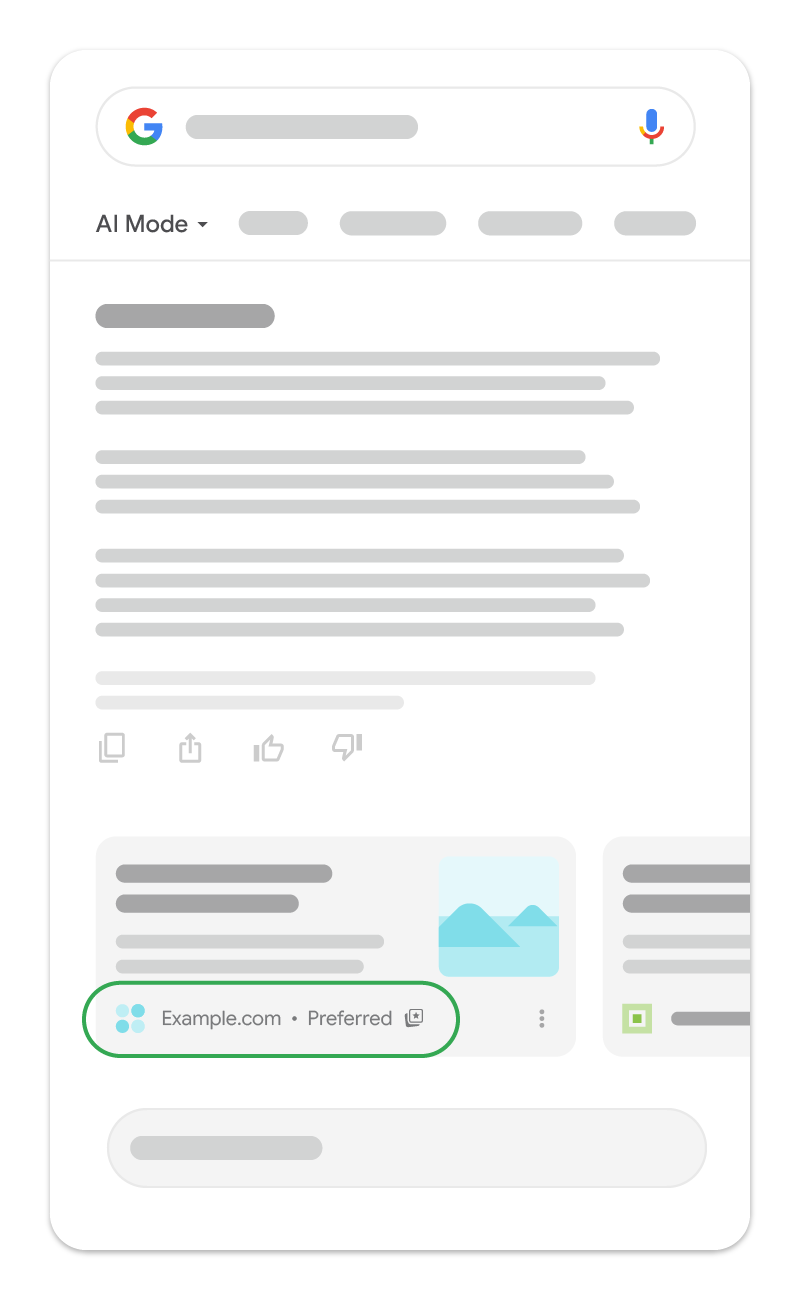
The badge next to a source’s name in results says “Preferred.” Only the person who added that source can see it, not every visitor.
One limit worth flagging up front: Preferred Sources is currently live only in the US and India, in English.
Google hasn’t said when or whether it’ll expand further.
If most of your traffic comes from outside those two markets, walk through the setup anyway so you’re ready when it lands, but don’t expect the star icon or button to do anything for readers elsewhere yet.
How to add a site as a preferred source (2 methods)
Both methods below come straight from Google’s own Search Help documentation, not from a publisher’s interpretation of it. Pick whichever one you land on first; they write to the same preference.
Method 1: Star icon inside Top Stories
- Go to google.com and search for a recent news-adjacent topic (Top Stories won’t appear for every query).
- Look for the “Top Stories” section on the results page.
- Click the star icon to the right of the “Top Stories” header.
- Search for the name or domain of the site you want to add.
- Click the checkbox next to it.
- Click “Reload results” at the bottom of the panel.
Method 2: Source preferences via your Google profile
- Go to google.com or open the Google app.
- Select your profile picture or initial in the top right.
- Go to Search personalization → Source preferences.
- Search for the source you want to add.
- Select the checkbox next to it.
| Method | Where it lives | Best for |
|---|---|---|
| Star icon in Top Stories | Search results page, appears only alongside Top Stories | Readers already looking at a news-style query who want to act in the moment |
| Source preferences (profile menu) | Google account settings, always accessible | Readers who want to set up several preferred sources in one sitting, or manage/remove existing ones |
Either method updates the same setting. Google’s own docs note that selecting a preferred source in one place tailors both your Top Stories and your AI Mode/AI Overviews experience together.
Is your site eligible?
Check eligibility directly: Go to Google’s Source Preferences Tool, search your domain name, and see if it shows up. If it does, readers can add it. If it doesn’t, they can’t yet, no matter how many times they search for it.
Two technical rules govern eligibility, straight from Google’s developer documentation:
- Domain and subdomain level only. www.example.com and blog.example.com are eligible. A subdirectory like www.example.com/blog is not. If your content sits in a subfolder of a larger domain, only the parent domain becomes eligible, not your section of it.
- AI Mode and AI Overviews eligibility is separate from Top Stories eligibility. To show up as a preferred source specifically inside AI Mode and AI Overviews, Google requires your site to be opted into “Search generative AI features” inside Search Console. Top Stories eligibility runs on its own separate criteria that Google hasn’t published as a checklist.
If your domain doesn’t show up in the tool yet, that’s not a permanent rejection; Google hasn’t published a formal appeals process or a fixed re-check timeline for this feature, so the honest answer is that consistent, fresh, relevant publishing and confirming your Search Console generative AI opt-in are the two levers you actually control while you wait. (Google hasn’t stated a re-check cadence publicly as of this writing; treat “how long until I show up” as an open question, not a promised timeline.)
Why schema and E-E-A-T signals affect eligibility
Google has never fully published its Top Stories eligibility criteria, but patterns in what Google has confirmed point to the same signals that already drive Google News inclusion and AI Overview citation: consistent publishing, clear authorship, and machine-readable trust signals.
This is an analysis connecting published eligibility criteria to broader E-E-A-T signals Google has confirmed elsewhere, not a direct Google statement that schema causes Preferred Sources eligibility. Flagging so it reads as informed interpretation, not an official rule.
Two schema types do double duty here.
- Person schema on your author bio gives Google (and any AI system parsing your page) a structured answer to “who wrote this and are they credible.”
- Organization schema does the same for the publication itself.
Neither one is a documented Preferred Sources requirement, but both are documented signals for how Google’s generative AI features decide what to surface and cite, which is the same surface Preferred Sources content shows up in.
If your site doesn’t show up in the source preferences tool yet, a reasonable place to start is checking whether your author bios and organization details have proper schema markup, alongside your Search Console generative AI opt-in.
Add a “Preferred Source” button to your own site (with code)
Google publishes an official, embeddable button for this. You don’t need to build a custom badge or guess at the interaction.
Standard implementation (recommended): Add this script tag, ideally inside your page’s <head>:
<script async src="https://news.google.com/swg/js/v1/publisher.js"></script>Then place this anywhere in your page body where you want the button to render:
<div google-add-preferred-source-btn></div>That’s it. Google auto-detects the element, renders a localized, Google-styled button, and handles the entire add-and-return flow.
To set a dark theme instead of the default light one:
<div google-add-preferred-source-btn data-theme="dark"></div>To override the button’s display language regardless of the visitor’s browser settings:
<div google-add-preferred-source-btn data-lang="en"></div>Deeplink implementation. If you can’t add JavaScript to your site (some CMS setups won’t allow it), link directly to the source preferences tool instead:
<a href="https://www.google.com/preferences/source?q=yourdomain.com">
Add as Preferred Source
</a>
Swap yourdomain.com for your actual domain. This works in a blog post, an email footer, or a social bio link exactly the same way.
Both implementations come directly from Google’s own publisher documentation. Test either one while signed into your own Google account before rolling it out to readers, so you can confirm your domain actually shows up in the flow.
FAQ
How do I add a website as a preferred source on Google?
Search for it inside Google’s Source Preferences Tool (accessible via your Google profile → Search personalization → Source preferences), or click the star icon next to the Top Stories header on a relevant search, then check the box next to the site.
How do I know if my site is eligible to be a preferred source?
Go to the Source Preferences Tool and search your own domain. If it appears in the results, it’s eligible for readers to add. If it doesn’t, it isn’t yet.
Does adding a preferred source change Google rankings for everyone?
No. The preference is tied to your Google account. It changes what you see in Top Stories, AI Mode, and AI Overviews. It doesn’t change how that site ranks in anyone else’s search results.
Is Preferred Sources only for news publishers?
It launched as a news-only, Top Stories-specific feature in August 2025. Google widened eligibility beyond news publishers through 2026, though Google hasn’t published a full list of which non-news categories qualify.
How do I add a preferred source button to my own website?
Add Google’s official script tag and a single <div google-add-preferred-source-btn></div> element to your page, or use a plain deeplink to google.com/preferences/source?q=yourdomain.com if you can’t add JavaScript.
Why isn’t my domain showing up in the Source Preferences tool?
Google hasn’t published a formal checklist for this. Confirm your domain (not a subdirectory) is what you’re searching for, check that you’re opted into Search generative AI features in Search Console for AI Mode/Overviews eligibility, and keep publishing fresh, relevant content in the meantime.