Summary:
- Google’s new “platform properties” let you track performance on Instagram, YouTube, and X in Search Console. No website required.
- TikTok sits on Google’s official platform list, but it’s dead weight if you’re in India. The app’s been banned here since 2020.
- Verification works one of two ways: auto-connect through an existing verified website property, or a direct login to the platform itself.
- Data starts collecting the moment you add the property, even before you finish verifying it.
- Rollout is gradual, and early access reportedly went first to accounts that already had Search profile access. If you don’t see the option yet, that’s the likely reason.
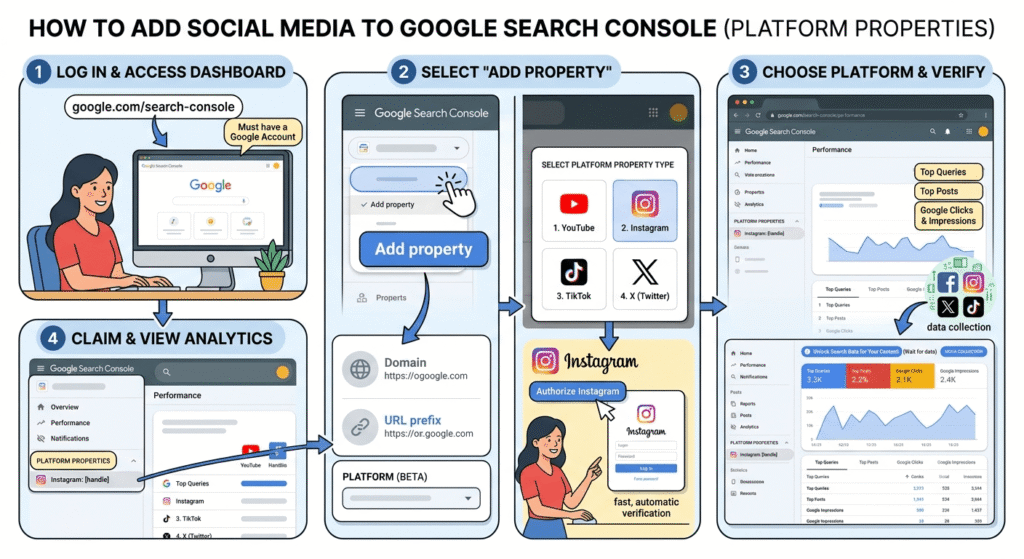
Google Search Console added a new property type in July 2026 called platform properties. It lets you track how your Instagram, YouTube, X, or TikTok content performs directly in Google Search, separate from any website you own. Here’s the short version: open Search Console, click “Add property,” pick your platform, then verify either through an existing verified website or by logging into the platform directly.
If you run a business in India, skip TikTok. It’s been unavailable in the country since 2020, and no update to Search Console changes that.
What Platform Properties Actually Are
Google shipped two different things here, and most of what’s floating around right now mixes them up.
In December 2025, Google added an experiment to Search Console Insights called social channels. It worked one way only: automatic. Google would detect a social profile it thought belonged to your website, then prompt you to confirm it. You couldn’t add a channel manually. You couldn’t use it if you didn’t already own a verified website. It lived inside your existing site’s Insights report, as an add-on, not a property of its own.
Platform properties, announced in July 2026, work differently in three ways that matter:
- You add it yourself. No waiting for Google to detect a match.
- You don’t need a website. Creators without a domain can now get real Search Console data for the first time.
- It’s a standalone property, not an add-on inside your site’s Insights report. It gets its own performance report, its own Insights tab, its own Achievements section.
If you’ve read that Search Console “shows social data now” and gone looking for the feature without success, you were probably looking at the wrong version. The auto-only December 2025 experiment and the manual July 2026 platform properties are not the same feature.
Which Platforms Are Supported (And the One That Isn’t Worth Your Time)
At launch, platform properties cover four platforms:
- YouTube
- X (formerly Twitter)
- TikTok
Three of those are worth setting up if you’re active on them. The fourth isn’t, if your audience is in India.
TikTok has been banned in India since June 2020. No Search Console update reverses that ban. If you’re running SEO for an Indian brand or you’re a creator targeting Indian search traffic, adding a TikTok platform property gives you a dashboard for an app your audience can’t open. Spend that setup time on Instagram or YouTube instead.
This matters because most of what’s been written about this launch treats the platform list as universal. It isn’t. Check where your audience actually is before you connect anything.
How to Add a Platform Property, Step by Step
Step 1: Open Search Console and Add a Property
Log in to Google Search Console with the Google account linked to your social profiles. Open the property selector (top-left dropdown) and click “Add property.”
Step 2: Select Your Platform
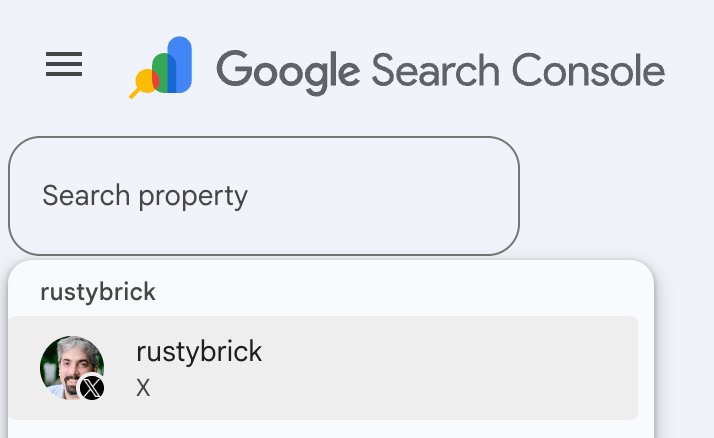
You’ll see the option to add a platform property alongside the usual Domain and URL-prefix website options. Pick the platform you want to track: Instagram, YouTube, X, or TikTok.
The exact click path in the property selector may vary slightly as Google continues to roll this out. Screenshot-level UI details aren’t confirmed here since the feature isn’t fully live for either of us yet. Treat this as directionally correct, not a pixel-perfect walkthrough.
Step 3: Verify Ownership
This is the step every other guide on this topic glosses over. Google’s own Search Console help documentation states verification happens one of two ways:
- Automated connection through an existing website property. If you already have a verified website in Search Console and your social profile links back to it, Google can automatically connect the two.
- Direct platform login. If you don’t have a verified website, or the automatic connection doesn’t trigger, you verify by logging directly into the platform account itself and confirming ownership there.
There’s no separate “verification code” step to paste into your bio, and no manual file upload. It’s one of those two paths.
Step 4: Wait for Data to Populate
Here’s the part almost nobody mentions: data collection for a platform property begins as soon as you add it to your account, before verification is complete. Verification confirms ownership and unlocks full access, but Google begins collecting performance data the moment the property is added to your account.
Practically, that means if you add the property today and verification takes a few days to clear, you’re not starting from zero once it does. The clock started when you clicked “Add property.”
Why You Might Not See This Option Yet
Google has said the rollout is gradual, and it’s not tied to account size, follower count, or any published eligibility list. One data point worth flagging, sourced from Daniel Waisberg (Google’s Search Console product lead) and reported by Search Engine Roundtable: early access appears to have gone first to accounts that already had access to Search profiles, the June 2026 feature that creates public-facing profile pages for qualified creators. This isn’t confirmed in Google’s own documentation, so treat it as a plausible explanation rather than an official rule.
If you don’t see “Add property” showing a platform option yet, it’s likely a rollout timing issue, not something broken on your end.
Platform Properties vs. the December 2025 Social Channels Experiment
| Social Channels (Dec 2025) | Platform Properties (Jul 2026) | |
|---|---|---|
| How you add it | Automatic detection only | You add it manually |
| Requires a website | Yes | No |
| Where it lives | Inside your site’s Insights report | Standalone property |
| Who can use it | Verified website owners Google selected | Any creator, website or not |
| Reports available | Insights only | Performance, Insights, Achievements |
What Data You Actually Get
Once a platform property is verified, you get three reports:
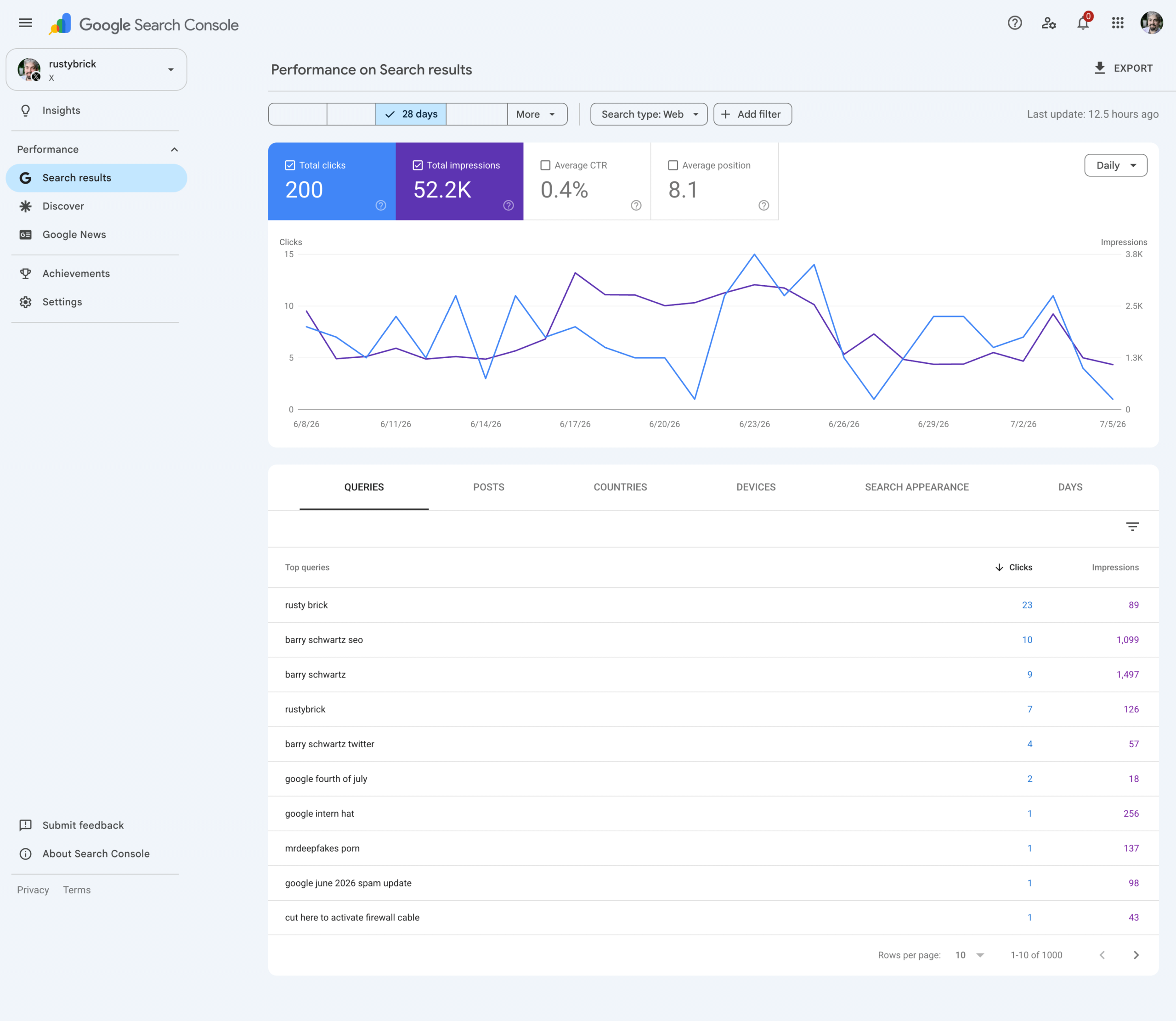
- Performance report: Total clicks and impressions from Google Search, top and trending queries, filtering and sorting, and data export.
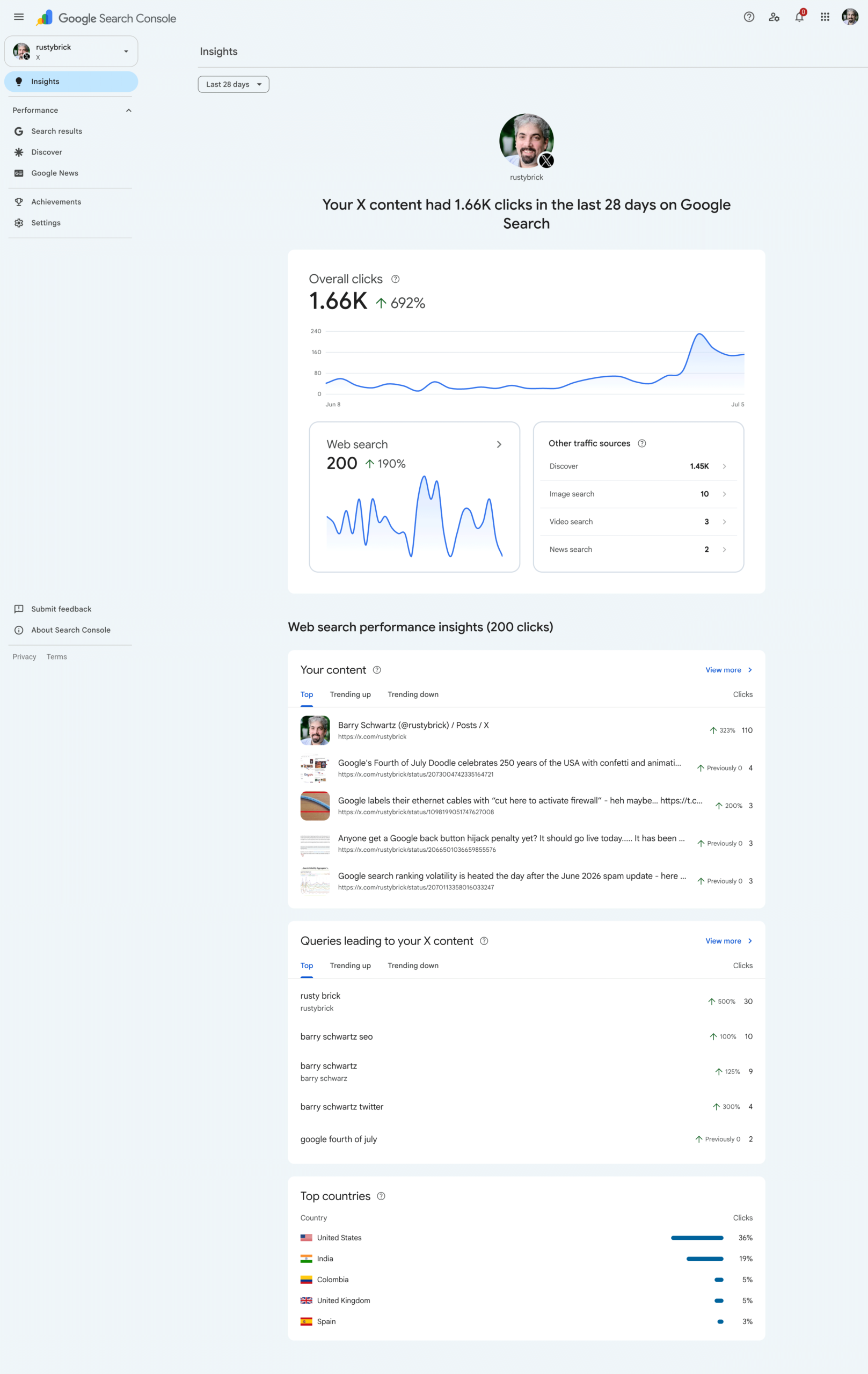
- Insights report: A high-level view of recent traffic trends and top-performing content.
- Achievements: Growth milestones, like crossing a new total-click threshold in a rolling 28-day window.
None of this replaces Instagram Insights, YouTube Analytics, or X Analytics. Those platforms show you engagement on their own turf: likes, shares, watch time. Search Console shows you something different: how people find that content through Google Search specifically. Run both side by side.
FAQ
Do I need a website to add social media to Search Console?
No. This is the main change from the December 2025 version. Platform properties work for creators without a verified website.
Why can’t I add my platform property yet?
Rollout is gradual. Early access reportedly favored accounts with existing Search profile access, though Google hasn’t published this as an official rule.
Does verifying a platform property affect my social account settings?
No. Verification confirms ownership for Search Console’s purposes. It doesn’t change anything on Instagram, YouTube, X, or TikTok itself.
Is TikTok supported in Search Console for Indian users?
TikTok is on Google’s official platform list, but the app has been unavailable in India since 2020. Adding a TikTok platform property won’t give you usable data if your audience is Indian.
How long until data shows up after adding a property?
Data collection starts as soon as you add the property, before verification completes. Full reporting depends on Google having seen your content in Search results, which can take a few days.

Mansoor Bhanpurawala is the founder of DigitalMansoor.com. With 20K+ followers on LinkedIn, he has been doing SEO since 2012 and, with over 14 years of experience, has helped 600+ clients across multiple industries build sustainable online growth.
With consulting, he enjoys sharing beginner-friendly guides to help others start and scale their blogs and brands. He’s grown client traffic up to 50X and revenue up to 240X. Helped multiple clients get mentions on TOI, Forbes, Mint, etc.
Leave a Comment