TL;DR
- A preferred source is a site you pick in your own Google account. Google then favors it in your Top stories, AI Mode and AI Overviews results. It is a personal setting.
- Two ways to add one: the star icon beside Top stories, or Search personalization, then Source preferences, in your Google profile menu.
- Only domains and subdomains qualify. Subfolders do not.
- Publishers can add an official button with two lines of code, or a plain link if they cannot edit their page head.
- Google does not list schema markup as a requirement. Treat it as good hygiene, not a switch.
You add a site as a preferred source on Google in two ways: click the star icon next to the Top stories header on a results page, or open your Google profile picture, go to Search personalization and choose Source preferences. Either route saves the same choice. Google then leans toward that site in your own Top stories, AI Mode and AI Overviews results. It does not change how the site ranks for anyone else.
What a preferred source means on Google
Preferred sources is a personalization setting. A signed-in reader searches for a site by name or domain, ticks a checkbox, and Google tailors that reader’s Top stories and AI results toward the site. Per Google Search Help, choosing sources in one place also tailors the other, and your settings follow you across browsers where you are signed in.
For site owners this matters because it is one of the few AI-search signals a reader controls directly. You cannot buy it or file a request for it. You can make it easy to act on. Press coverage dates Google’s publisher button announcement to around 20 August 2026. The feature is documented on Google’s own developer page for publishers, last updated 18 September 2026 at the time of writing.
How to add a site as a preferred source on Google
| Method | Where it lives | Best for |
|---|---|---|
| Star icon in Top stories | Search results page, only when Top stories appears | Acting on the spot while reading a news-style result |
| Source preferences in your profile | Profile picture, Search personalization, Source preferences | Adding several sites at once and reviewing your list |
Method 1: the star icon in Top stories
- On a computer, go to google.com and search for a recent news event.
- If Top stories appears, click the star icon on the right of the Top stories header.
- Search for the source you want.
- Tick its checkbox.
- Click Reload results at the bottom.
Method 2: Source preferences in your Google profile
- Go to google.com or open the Google app.
- Select your profile picture or initial at the top right.
- Choose Search personalization, then Source preferences.
- Search for the source and tick its checkbox.
- Find it under Your sources at the bottom of the screen.
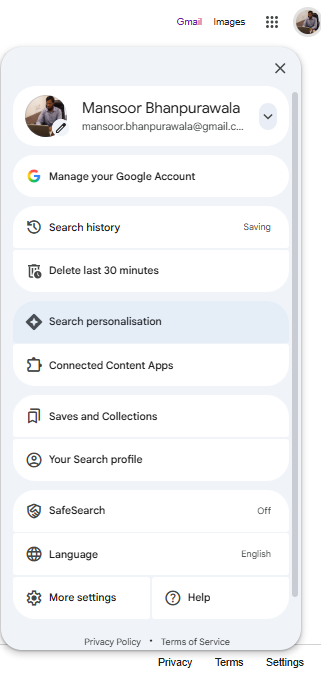
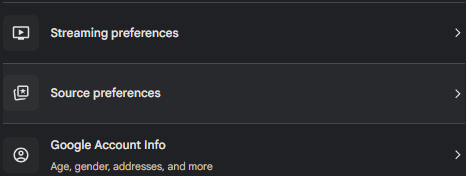
To remove a source from Top stories, click the star, clear the blue checkbox beside the name and press Reload results. Google’s Search Help page does not give explicit removal steps for the AI Mode and AI Overviews path, so I will not invent them.
Is your site eligible?
Search your own domain in the Source preferences tool. If it shows up, readers can add it. If it does not, they cannot yet. Google’s developer documentation sets these rules. The screenshot below shows the tool with digitalmansoor.com found and ticked:
- Domain or subdomain only. A site like code.example.com qualifies. www.example.com/blog does not.
- Search Console opt-in for AI surfaces. To appear as a preferred source in AI Mode and AI Overviews, your site must be included in Search generative AI features in Search Console.
- Participation is optional. The page says you do not have to take part to appear.
- Freshness. Search Help notes that sources that are not updated regularly may not be available.
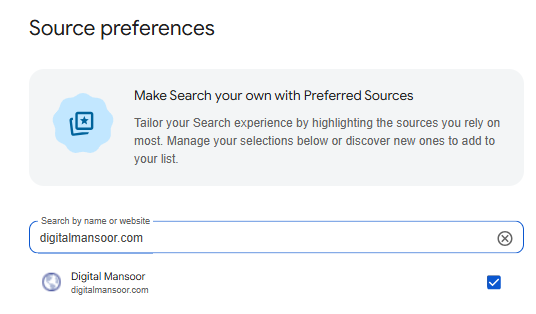
Google has not published a re-check timeline or an appeals process. If your domain is missing, confirm the three points above and keep publishing. Anyone who gives you a number of weeks is guessing.
Does schema markup help you become a preferred source?
Google does not list schema as a requirement for this feature. Its documented rules are the domain rule, the Search Console opt-in and regular updates. Whether Organization or Person markup nudges eligibility is not something Google has said, so I treat it as inference, not fact.
I still recommend it, for a plain reason: clear authorship and organization markup helps Google and other systems understand who publishes a page, and that supports the trust signals that apply across Search. Build the markup with the Schema Markup JSON-LD Generator, then score your author bio with the E-E-A-T Author Bio Score Checker. You can find the rest of the set on the free SEO tools page. This page carries FAQPage and HowTo markup in the source for the sections you are reading.
Add a Preferred Source button to your own site
Google publishes an official, embeddable button. Add this script, preferably inside the page head:
<script async src="https://news.google.com/swg/js/v1/publisher.js"></script>Then place this where the button should appear:
<div google-add-preferred-source-btn></div>
The default theme is light. Set a dark theme or force a language with these attributes. The button follows the reader’s browser language unless you override it.
<div google-add-preferred-source-btn data-theme="dark"></div>
<div google-add-preferred-source-btn data-lang="en"></div>
No JavaScript? Use the deeplink
If your CMS blocks scripts, link straight to the tool and swap in your domain:
<a href="https://www.google.com/preferences/source?q=example.com">
  Add as Preferred Source
</a>
The same link works in an email footer or a social bio. Test it while signed in to your own Google account and confirm your domain appears in the flow before you ship it to readers.
FAQ
How do I add a website as a preferred source on Google?
Open your Google profile picture, go to Search personalization, then Source preferences, search for the site and tick its checkbox. You can also click the star icon next to the Top stories header on a results page, tick the site and press Reload results.
How do I know if my site is eligible to be a preferred source?
Open the Source preferences tool and search for your domain. If it appears, readers can add it. Only domains and subdomains qualify. A subfolder such as example.com/blog does not.
Does adding a preferred source change Google rankings for everyone?
No. Google’s documentation describes it as a personal setting that tailors the Top stories, AI Mode and AI Overviews you see while signed in. Nothing in it says it changes rankings for other people.
Do I need to be a news publisher to be a preferred source?
Google’s developer page does not set a news-publisher requirement. It lists domain-level eligibility, a Search Console opt-in for AI Mode and AI Overviews, and says participation is not required. Search Help adds that sources that are not updated regularly may not be available.
How do I add a preferred source button to my own website?
Add Google’s script tag to your page head and place a div with the google-add-preferred-source-btn attribute where you want the button. If you cannot add JavaScript, link to google.com/preferences/source with your domain in the q parameter.
Why is my domain not showing in the Source preferences tool?
Google has not published a checklist or timeline. Check that you searched the domain and not a subfolder, confirm your site is included in Search generative AI features in Search Console, and keep publishing fresh content, since sources that are not updated regularly may not be available.