
Last updated on November 16th, 2026 at 01:12 pm
A canonical tag is a link element in the head of a page that names the URL you want Google to treat as the main version when several URLs show the same or very similar content. Google calls it a strong signal, not a command. It can still choose a different URL if it disagrees with you.
That one fact explains most canonical tag problems. People treat the tag as a switch, and Google treats it as one vote among several. This guide covers what the tag does, how to write it, where it goes wrong and how to check what Google actually decided.
Why Google bothers with canonicals
Google’s documentation on consolidating duplicate URLs gives four reasons to specify a canonical. You show users the URL you prefer in search results. You consolidate signals, such as links, into one preferred URL. You simplify tracking metrics for a piece of content. And you avoid spending crawl time on duplicate pages.
Duplicates happen more often than people expect, and rarely on purpose. The same page can load at HTTP and HTTPS, with and without www, with a tracking parameter appended, with a sort order in the query string, or under two category paths. Each version is a separate URL to a crawler.
Without a canonical, Google picks one itself. Its documentation says it will identify the version it considers objectively best. That might be the one you wanted. Or it might not.
The syntax
The tag sits in the head of the page:
<link rel="canonical" href="https://www.example.com/shoes/running/" />
Google also supports the canonical as an HTTP header, which works for non-HTML files such as PDFs, where there’s no head to put a tag in.
Four rules cover most of the syntax.
- Use an absolute URL, with protocol and domain. Google says to use absolute URLs in rel=”canonical”, not relative paths.
- Put the tag in the head. A canonical placed in the body won’t be read as one.
- Declare one canonical per page. Two competing tags give Google a conflict to resolve.
- Make the page canonical to itself. Google recommends a self-referencing canonical on the canonical page too, so every version of the content carries the same instruction.
How strong a signal is it?
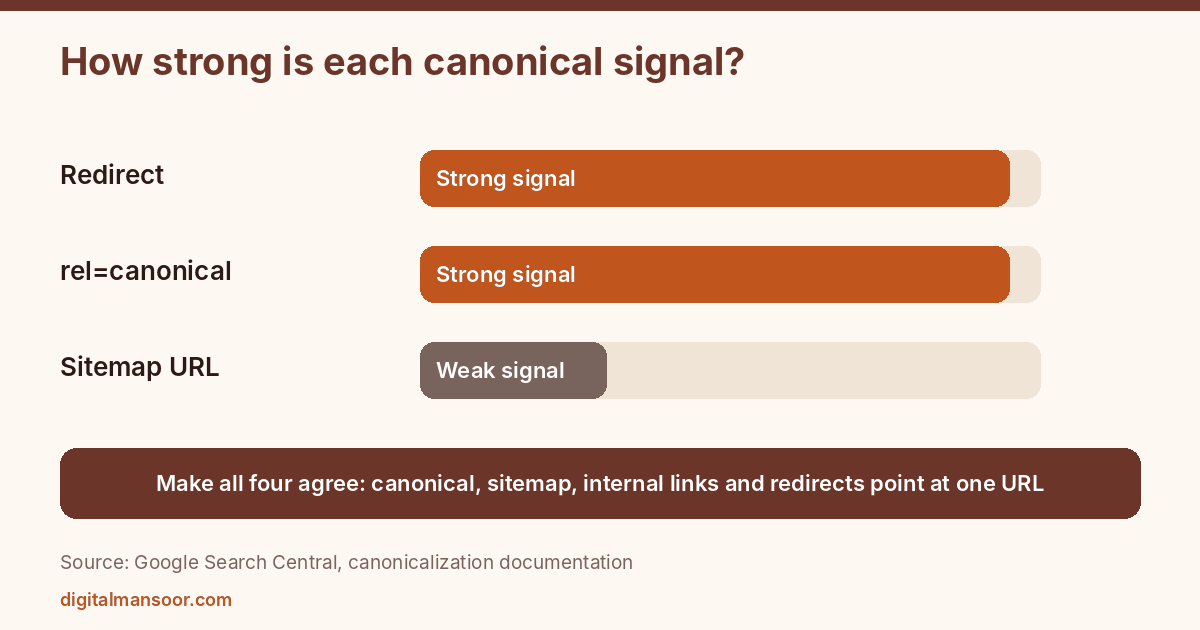
Google ranks the methods you can use, strongest first. Redirects are a strong signal that the target should become canonical. The rel=”canonical” annotation is also a strong signal. Including a URL in your sitemap is a weak signal.
Google also says it decides which pages are actually duplicates based on content similarity. So a canonical between two pages that differ in substance may simply be ignored. If you canonicalize a product page to a category page, Google can look at the two, see that they aren’t the same thing, and keep both.
The practical lesson: your signals should agree with each other. If the canonical says A, the sitemap lists B, internal links point to C and a redirect sends C to D, Google has to guess. Pick the preferred URL, then make the canonical, the sitemap, the internal links and the redirects all point at it. Google specifically says to link internally to the canonical URL.
When to use a canonical tag
Several situations call for one.
URLs with parameters. Tracking codes, session IDs and sort or filter parameters create copies of the same page. A canonical to the clean URL consolidates them. Product variants add a wrinkle. Google’s product variant documentation says each variant needs a distinct URL it can preselect, and that a single-page product setup must have only one distinct canonical URL for the overall group.
Protocol and host variants. HTTP versus HTTPS, and www versus non-www. A redirect is the stronger fix here, but a canonical on each page adds a second signal. Google says it prefers HTTPS over HTTP unless signals conflict, such as an invalid certificate or HTTPS-to-HTTP redirects.
Print versions and mobile subdomains that serve the same content are common sources of duplicates too, as is content that sits on more than one path in your own site, such as a post filed in two categories.
Content you syndicate. Google’s page I fetched doesn’t cover cross-domain syndication in detail, so check the current documentation before relying on a cross-domain canonical.
And when a duplicate page has no reason to exist at all, use a redirect instead. Google says to use permanent redirects when you’re deprecating a duplicate page. A canonical keeps both URLs reachable. A redirect removes the duplicate from the path altogether.
Mistakes that break canonicals
Using robots.txt or noindex to handle duplicates. Google says not to use either for canonicalization. A robots.txt block doesn’t prevent a URL from being indexed, and noindex removes the page from Search entirely, which is the opposite of consolidating signals.
Using the URL removal tool for it. Google lists this as another thing not to do.
Mixing methods that disagree. Google says to avoid canonicalization methods that point to different URLs for the same page. It also suggests choosing one method for rel=”canonical”, the HTML tag or the HTTP header, instead of using both, to avoid conflicts.
Pointing every paginated page to page one. Google’s 2013 post on common rel=canonical mistakes warns against canonicalizing page two of a series to page one, since the pages hold different items. Treat that older post as a reminder of intent, and check current guidance before applying it to a complex setup.
Letting JavaScript rewrite it. Google says to put the canonical in the HTML source where possible and not to let JavaScript change it. A script that swaps the canonical after load can give Google two versions of the instruction.
Setting a URL fragment as the canonical. Google lists this as a mistake too.
Breaking hreflang. On multilingual sites, Google says to canonicalize to a page in the same language, or the best available substitute. A French page that canonicalizes to the English version tells Google to ignore the French one.
Pointing canonicals at pages that don’t work. A canonical aimed at a redirecting, blocked or noindexed URL sends contradictory signals. That one is my reading of Google’s conflict rules, not a rule Google states in those words.
How to check what Google chose
Don’t stop at viewing the page source, because the tag you wrote and the URL Google selected can differ.
First, view the source and confirm there’s exactly one canonical tag with the URL you expect. Search for “canonical” so you don’t miss a second one added by a plugin.
Second, run the page through the URL Inspection tool in Search Console, which reports the canonical you declared and the one Google selected. When they differ, ask why. Look for conflicting signals: a sitemap URL that differs, internal links to a parameter version, or content that is nearly identical to another page.
Third, read the Page indexing report for statuses about duplicates. “Duplicate, Google chose different canonical than user” is the one to watch, because it means your declared canonical lost. The usual causes are the conflicts above or content too similar to another page.
When you find a mismatch, fix the signals that disagree with your preferred URL before you touch the tag. Rewriting the tag alone won’t change anything if three other signals point elsewhere.
Canonical, noindex or robots.txt?
These three get confused, and Google’s page treats them as separate jobs.
| Tool | What it does | Use it for |
|---|---|---|
| rel=”canonical” | Tells Google which of several similar URLs to prefer | Duplicates you want consolidated but still reachable |
| noindex | Removes the page from Search entirely | Pages with no search value, such as internal results |
| robots.txt | Stops crawling but doesn’t prevent the URL from being indexed | Saving crawl effort on sections nobody needs crawled |
Notice that none of them replaces another. If a page is a duplicate you want folded into a main version, reach for the canonical. If it should never appear in Search, use noindex. Don’t use a noindex to make a canonical choice, because Google says it removes the page rather than consolidating it.
A fifteen-minute routine for a whole site
Crawl the site with any crawler that reports canonical URLs. Filter for pages where the canonical differs from the page’s own URL, and sort the list by URL pattern. Each pattern should have an explanation: parameters, a retired path, an intended duplicate. Any pattern without one needs a look.
Then filter for pages with no canonical at all and pages with more than one. Fix the multiples first, since a conflict is worse than an omission. Finally, compare the canonical for each important page against its sitemap entry and its main internal links. They should all agree, which is the single most useful audit rule for this tag.
Canonical tags in WordPress
Many WordPress SEO plugins output a self-referencing canonical on every page. That’s fine until a second plugin or a theme adds its own, so check the source of three or four key pages after any plugin change.
Also watch the pages your site generates without you noticing: tag archives, author archives, attachment pages, and paginated archives. Decide on purpose whether each should be indexed, and set its canonical accordingly. If an archive has no value, a noindex tag is the right tool for keeping it out of the index, but don’t combine it with a canonical to another page. Google says noindex isn’t a canonicalization method.
What a canonical tag can’t do
It can’t fix thin content. If two weak pages point at each other, you’ve consolidated two weak pages into one weak page. It can’t hide a page from Search, since a canonical page stays indexable by design. And it can’t merge two pages that cover different topics, because Google looks at content similarity before it accepts the suggestion.
Think of it as housekeeping for URLs that already deserve to exist. The harder question of whether a page deserves to exist at all comes first, and no tag answers it.
Quick answers
Is a canonical tag the same as a redirect?
They both consolidate URLs but work differently. A redirect sends visitors and crawlers to the new URL, so the old one disappears from their path. A canonical leaves both URLs reachable and tells Google which one to prefer.
Should every page have a canonical tag?
A self-referencing canonical on each indexable page is Google’s recommended practice, so yes in practice. It states the preferred version of each page unambiguously.
Can Google ignore my canonical?
It can. Google treats the tag as a strong signal, and it uses content similarity to decide what counts as a duplicate. If the pages differ materially or your other signals disagree, Google may choose another URL.
Your next check
Pick your five most important pages and run each through URL Inspection. Write down the declared and Google-selected canonicals side by side. If any pair differs, you’ve found a conflict worth fixing today. For a site-wide review, my technical SEO consulting page explains how I audit duplicate-URL problems.
Leave a Reply