Last updated on November 16th, 2026 at 01:13 pm
Google generally ignores anything after a # in a URL, and many stores build their filters and page numbers on exactly that. Shoppers can click through, but Google gets nothing to crawl. An ecommerce SEO checklist has to start with how Google reaches your products, because ranking, schema and content all depend on it.
This checklist is ordered by consequence, not by how easy each item is. Work through it top to bottom, and stop to fix a section before you move on. The first four sections cover the crawl problems that Google’s own ecommerce documentation addresses.
1. Make every category page crawlable
Google’s pagination guidance for category pages is specific. Give every page in a sequence its own URL, such as ?page=2. Don’t put page numbers after a #, since Google ignores fragments.
Link from each page to the next with a real <a href> tag. Google doesn’t click buttons or trigger scroll-based JavaScript, so a “Load more” button or infinite scroll with no crawlable links means products beyond the first screen may never be discovered. If your theme does this, ask your developer to add plain links to the next pages underneath the script.
Give each paginated page its own canonical URL. Pointing every page at page one tells Google to ignore the products on pages two onward. Google also says it no longer uses rel="next" and rel="prev", so you can stop worrying about those tags.
Check this on your own store. Open a category in a browser, view the source and search for the link to page two. If it’s missing, you’ve found a priority fix.
2. Control filters and facets
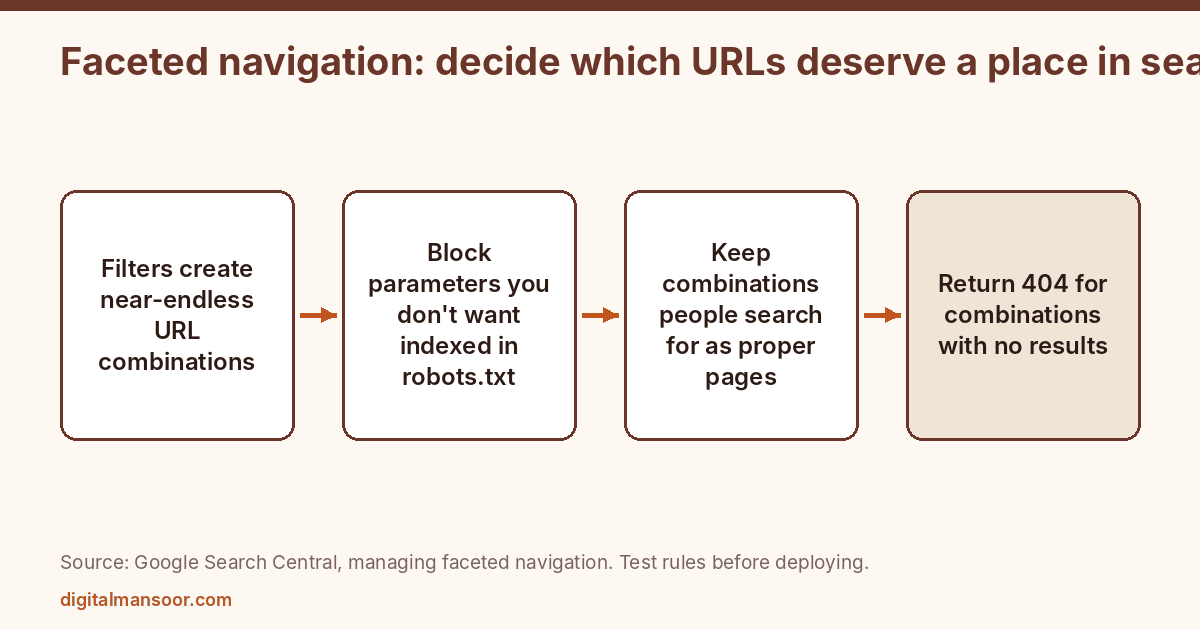
Faceted navigation (colour, size, price, brand) can generate near-infinite URLs from a handful of products. Google’s faceted navigation guide says crawlers can waste time on these, which loads your server and slows discovery of pages you want found.
If you don’t need filtered URLs in search, block them. Google’s guide recommends disallowing the filter parameters in robots.txt while allowing the single unfiltered listing page. The guide says there is no good reason to allow crawling of filtered items you don’t want indexed. A canonical to the unfiltered page or nofollow on the links are weaker options, according to the same page, and nofollow only works if every link to the filtered page carries it.
If some filtered pages deserve to rank, such as “women’s running shoes size 7” because people search that, treat them as real pages. Use & to separate parameters, since commas, semicolons and brackets are often not recognised as separators. Keep filter order consistent, so you don’t create the same page at two URLs. And return a 404 for combinations with no results, not a soft error page or a redirect to a generic page.
Use the robots.txt checker to test that your rules block what you intend before you deploy them.
3. Handle sort orders and duplicate lists
A sort parameter such as ?order=price shows the same products in a different order. Google’s pagination page says to use noindex or block the pattern in robots.txt for these variations. Pick one approach per pattern and apply it consistently.
After you apply the rule, test a few real sort and filter URLs in the URL Inspection tool in Search Console. It shows whether Google can fetch the page and how it treats it, which beats guessing from the robots.txt file alone.
A store with a few hundred products can often manage this by hand. A store with tens of thousands needs the rule built into the platform, so the next developer who adds a filter doesn’t undo it. Write the rule down in a short document that lists which parameters exist, which ones are blocked and why. Reviewing that list each quarter takes minutes and protects months of work.
4. Check what Google has indexed
Open the Page indexing report in Search Console. Look at “Crawled, currently not indexed” and “Discovered, currently not indexed”, which Google lists as reasons pages are left out. A large pile of product URLs in either group suggests Google doesn’t see enough value, or can’t reach the pages easily.
Then run a site: search for your domain and skim what appears. If you see parameter URLs, internal search results or cart pages where you expected clean product and category pages, your crawl rules need work. This check takes ten minutes and tells you more than most audits.
5. Product pages: one URL per product
Each product that a customer can buy should have one page with a stable URL. Where a product has variants such as colour or size, decide whether they live on one page with a selector or on separate pages. Google’s structured data documentation supports variant markup that tells it which products are versions of the same parent, in both snippets and merchant listings.
Write a unique description for each product. Manufacturer text copied across hundreds of stores gives Google no reason to prefer yours. Add what you know that the box doesn’t say: sizing notes, materials, how the product behaves in use, what questions customers ask. If you sell something you can photograph yourself, do it.
Show the price, the stock status and the shipping or return terms where shoppers can see them. Those same details feed structured data, and a mismatch between the page and the markup is a common cause of warnings.
6. Structured data that matches the page
Google separates two cases. Product snippets are for pages where shoppers can’t buy directly, such as reviews or editorial pages. Merchant listings are for pages where customers can buy from you, and they support more fields such as apparel sizing, shipping details and return policies. Meeting merchant listing requirements also makes the page eligible for product snippets.
For an Indian store, set priceCurrency to INR and keep the price in the markup identical to the visible price. Google’s page doesn’t discuss India, so I’m giving you the schema.org convention, not a Google rule. Generate and check your markup with the schema markup JSON-LD generator, then validate in Google’s Rich Results Test.
Markup doesn’t create rankings. It helps Google understand the page and may make it eligible for richer displays. Only mark up what’s visible to the shopper.
7. Titles and headings
Write category titles around what a shopper types, with the category name first and a modifier if it helps, such as the product type and a differentiator. Give product pages a title that includes the product name and the one attribute that distinguishes it, like the model or size.
Google says paginated pages can share the same titles and descriptions, so don’t waste time rewriting page two and page three. Spend that time on pages that earn clicks.
8. Internal links from places that carry weight
Link from your homepage and top navigation to the categories that matter most. Link from category pages to their best-selling or highest-margin products. Link from blog posts and buying guides to the relevant category, with descriptive anchor text.
Check for orphan products with a crawler. A product that no page links to depends entirely on the sitemap, and the pagination page says a sitemap or Merchant Center feed can help Google find products, though real links are stronger evidence that a page matters. Generate and submit a clean sitemap with the XML sitemap generator if your platform doesn’t produce one, and list only URLs you want indexed.
9. Retired and out-of-stock products
Decide a rule and write it down. A product that’s temporarily out of stock usually keeps its page with an honest stock status. A product that’s gone for good needs a plan: redirect to the closest replacement if one exists, and use a 404 if nothing fits. Use the redirect checker to confirm each redirect lands where you expect.
I haven’t re-read Google’s current guidance on discontinued products for this article, so check its ecommerce documentation before you set a rule at scale.
10. Content that supports buying
Category pages with only a product grid give Google little to work with. A short block of useful copy near the top or bottom, written for shoppers, helps. Say what the category contains, how to choose between the options and what the main differences are.
Buying guides and comparison articles fill the gap between a search and a purchase. Build them around questions your customers ask support, not around keywords alone. Link each guide to the categories it feeds.
11. Speed and mobile
Most Indian shoppers browse on phones, so test product and category pages on a mid-range phone over a mobile connection. Compress images, defer scripts you don’t need and avoid pop-ups that cover the product. I have no sourced figure for Indian mobile share in this article, so check a current source before you quote one.
12. Check the pages shoppers see after they search
Search for five of your own products and five categories the way a customer would. Look at what Google shows for each: the title, the snippet, the price if any, the image. Click through and see whether the page matches what the result promised.
Fix the mismatches you find. A title that promises “free delivery” on a page that hides the delivery terms loses trust fast. A snippet that shows an old price pulls the wrong visitors. Ten searches take half an hour and often reveal a pattern, such as one template that has the same flaw on every page.
13. Measure by page type
Filter Search Console by URL pattern: products, categories, blog. Track impressions, clicks and indexed counts for each group. When one group drops, you know where to look.
Also tie organic traffic to revenue in your analytics, not only to sessions. A page that attracts visits and no purchases needs a different fix than a page nobody sees.
Quick answers
Do I need a blog for ecommerce SEO?
Not every store does. It helps when customers research before buying and your categories can’t answer their questions.
Should I noindex all filtered pages?
Not necessarily. Block the ones with no search demand and keep the ones people actually search for, built as proper pages.
Does Google Merchant Center matter for organic results?
Google’s pagination page says a Merchant Center feed can help Google find all your products. Merchant listing markup on the page also makes products eligible for richer displays. Treat the feed as a supplement to crawlable links, not a replacement for them.
How long does it take to see results?
Google gives no timeline. Crawl and indexing fixes can show in Search Console within weeks, but ranking changes vary.
Where to start
Do sections 1 to 4 this week. They need no new content, only access to your platform settings and Search Console. If you want an audit of your store’s catalog, categories and crawl rules, see my ecommerce SEO consultant page.
Leave a Reply