Last updated on November 16th, 2026 at 01:13 pm
SaaS content marketing works when each piece needs your product or your data to exist. A post that a freelancer could write from the top ten search results adds nothing a buyer can’t already find, and Google’s own quality questions ask whether a page provides substantial value compared to other pages.
That test explains most SaaS blog failures. Founders publish “what is” articles on topics where established tools already dominate, then wonder why signups don’t move. This guide covers what to publish instead, in the order I’d do it for a small SaaS, with one of my own client results as a worked example and its limits stated.
What Google asks about your content
Google’s page on helpful content lists questions for self-assessment. They include whether the content provides original information, reporting, research or analysis, and whether it gives insightful analysis beyond the obvious. Another asks whether it provides substantial value when compared to other pages in search results. One more asks whether the content is mass-produced by or outsourced to a large number of creators.
None of that is SaaS-specific, but SaaS companies fail those questions often. A project management tool’s “10 tips for better team communication” competes with every other blog on the internet and offers no reason to prefer yours. Your product, your customer questions and your usage data are the things competitors can’t copy.
How SaaS content differs
A SaaS buyer usually researches for longer than someone buying a pair of shoes, and several people may weigh in. The content has to serve people at different stages: learning that a problem has a software fix, comparing options, and checking whether your tool fits their situation.
Ahrefs describes its own approach as product-led content: prioritizing topics where you can help people solve problems with the help of your product. That definition is useful because it gives you a filter. If a topic has no natural place for your product to appear as part of the answer, it’s a weak candidate for your blog, however much traffic it gets.
What to publish first
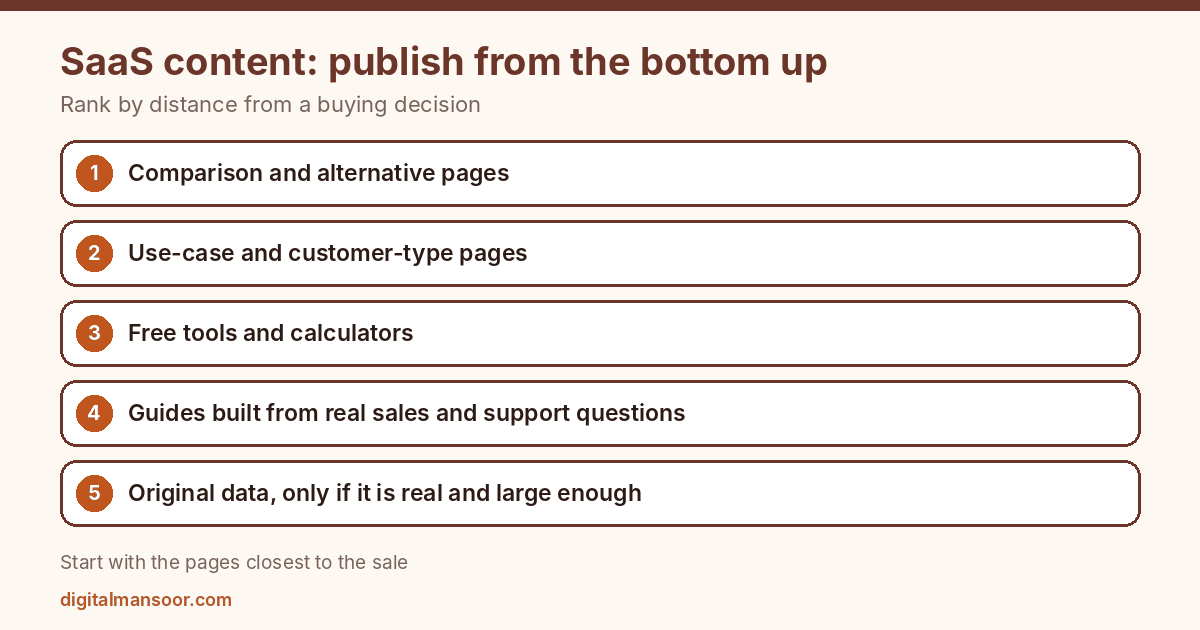
Rank content by how close it sits to a buying decision. Small teams should work from the bottom up.
Comparison and alternative pages
Buyers who search for a rival’s name plus the word alternative, or for your product against a rival, are comparing options and often close to a decision. These pages also carry risk: claims about a competitor must be accurate and current, or you invite complaints and lose credibility. Date the page, state what you compared and avoid rankings that flatter you without evidence.
Use-case and customer-type pages
Pages for specific industries or roles let you speak to one buyer directly. An accounting tool for petrol pumps can talk about the daily problems of a petrol pump owner in terms a generic page can’t. Each page needs real content: the workflow, screenshots, the specific reports that matter to that buyer. Swapping an industry name into a template is the pattern that gets pages classified as thin.
Free tools and calculators
A calculator that solves a real task for your target buyer attracts search traffic and shows your product’s domain knowledge. It works when the tool does something useful by itself. A gated “calculator” that only collects emails is an advert.
Education aimed at your buyer’s actual questions
After the pages above, write guides on the questions your sales and support teams hear repeatedly. These are not the questions you’d find by looking at head terms. They are the ones a customer asks in week one or the objection that stalls a deal.
Original data
If your product generates usage data, anonymized and aggregated, you may have material no one else can publish. Ahrefs notes that original research attracts backlinks because other writers cite it. It only works if the data is real, the method is clear and the sample is large enough to mean something. Don’t publish a survey of twelve people as an industry report.
A worked example, with its limits
I published a case study of an anonymous India-based accounting SaaS company, covering November 2025 to February 2026 against a July to October 2025 baseline. At the start, the site had traffic but no non-branded clicks. The work included new pages for non-branded queries such as free accounting software and GST software, re-optimized older posts, pages for specific customer types, two free calculators, a comparison page against Tally and listings on five software directories.
Non-branded clicks went from zero to 445 and non-branded impressions from zero to 52,300 over the period. Total clicks rose from 3,980 to 4,480, a gain of 12.6%.
Read the caveats before you copy anything. The gain is small in absolute terms. Clicks on the top branded query fell 31% and homepage clicks fell 26.4%, and the cause of the branded decline is unconfirmed. Several changes ran at the same time, so I can’t say how much each one contributed. The 67 registration-page clicks are clicks, not signups, because signup completion wasn’t tracked. The case study is published by the consultant who did the work, so treat it as promotional. You can read the full write-up on the SaaS SEO case study page.
What the example does show is the order of work. The pages closest to a buying decision produced the first non-branded clicks, and the calculators drew traffic on their own.
A one-quarter plan for a small team
This plan is illustrative, not a template to copy. Imagine a three-person SaaS team with one part-time writer.
In month one, they write two comparison pages against the tools their sales team hears about most, and one use-case page for their strongest customer type. They add event tracking for registration clicks and signups.
In month two, they build one small calculator tied to a task their customers do weekly, and they write two guides from recorded support calls. They also review the older blog posts and pick any that already rank on the second page for re-optimization, since those need less work than new pages.
In month three, they read Search Console by page group, drop or rewrite what shows no impressions and plan the next quarter from what drew non-branded clicks. The plan stays small on purpose. Ten solid pages that each answer a real buyer question beat forty thin ones, and the team can keep them accurate.
Help content counts too
Documentation, setup guides and template libraries are content, and they sit on the retention side of the funnel. A customer who finds a clear answer to a setup question inside your help centre stays longer than one who files a ticket. Some of those pages also bring new users from search, since people often search for a task before they search for a product.
Treat help content with the same standard as marketing pages: accurate, dated and reviewed by someone who knows the product. Link from help articles to the relevant product page where it helps the reader, and don’t turn every help article into an advert.
Mistakes that waste a SaaS content budget
Publishing “what is [category]” posts first. These compete with the biggest names in your category, and a small site rarely wins them.
Ignoring the product. A post that never shows a screenshot, a workflow or a feature gives a reader no path from the article to the tool. Link each piece to the part of the product it relates to.
Measuring traffic as the goal. Traffic that never registers is a cost. Track trial starts and signups by landing page, or you’ll end up in the position my case study describes, where nothing past the page click was instrumented.
Scaling with AI drafts. A tool can produce fifty articles in a day, but Google’s questions on mass production and value over other pages apply. A SaaS blog full of interchangeable posts is the pattern those questions describe.
Letting content go stale. A comparison page with last year’s pricing damages trust. Review comparison and feature pages on a schedule, and show the date.
Who should write it
The best SaaS posts come from someone who has used the product with a customer. If your writers are outsiders, give them a way to talk to your support team, a product manager and a few customers. Record those conversations, and build drafts from what people say. A freelancer who never touches the product will write the same article your competitors already have.
Review technical claims with an engineer or product owner before you publish. A wrong statement about how your integration works costs more than a slow week.
How to measure it
Set up these views before you publish anything.
In Search Console, filter queries to exclude your brand name, so you can see non-branded clicks and impressions by page. Group pages by type: comparison, use case, tool, education. In your analytics, record an event for registration clicks and another for completed signups, and tie both to the landing page. In your CRM, mark which leads came from content so sales can tell you which pages bring buyers.
Review monthly, not weekly. Content takes time to settle, and Google publishes no timeline for it.
The case study I mentioned counted 104 organic visits from AI assistants (ChatGPT, Perplexity, Gemini and Copilot combined). That’s a channel-level count of referred sessions, not a measure of visibility in AI answers. Track it separately and don’t extrapolate from it.
The topical authority guide shows how to connect these pages into clusters. Be careful with templated pages at scale, covered in the programmatic SEO guide. Comparison and use case pages can compete for one query, so check the keyword cannibalization guide. My content strategy SEO service covers this planning.
Quick answers
Do SaaS companies need a blog?
Not always. A new product with no budget may get more from comparison pages and a few use-case pages than from a regular blog. Add the blog when you have questions to answer.
How many posts per month?
There is no verified number. Publish at the pace you can keep accurate and tied to the product.
Should I gate content behind email?
Gating reduces reach, and it can suit research reports your sales team will follow up. Free tools and comparison pages should stay open.
Is a comparison page risky?
It can be. Any claim about a rival has to be accurate on the day you publish and stay accurate afterwards. Check the rival’s current pricing and features, state the date, and remove statements you can’t support. A sourced, dated page earns more trust than a page that reads like an advert.
Where does thought leadership fit?
Opinion pieces help when they come from someone with real experience and a clear point of view. They won’t replace the buying-stage pages above.
Where to start
List the ten sales questions you hear most. Check which already have a page on your site. Build the comparison page and one use-case page first, then add a tool if you can build one that stands alone. If you want help planning this for your product, see my SaaS SEO consultant page.
Leave a Reply