Last updated on November 16th, 2026 at 01:13 pm
Two of your pages show up for the same search. Most SEO tools call that keyword cannibalization and flag it in red. Google’s John Mueller has said, in answer to a question on the topic, that several of your pages ranking for the same phrase is not a problem by itself. Both statements can be true, and the gap between them is where site owners waste months merging pages that were fine.
This guide covers what keyword cannibalization actually is, how to check for it in Search Console, which cases need a fix and which don’t, and the order of fixes from lightest to heaviest.
The definition that matters
Keyword cannibalization means two or more pages on your site compete for the same intent, and the competition hurts both. The word “intent” does the work in that sentence. Two pages can rank for one keyword and serve different readers. A guide titled “what is a canonical tag” and a page titled “canonical tag audit service” may both appear for “canonical tag”, and neither takes anything from the other.
Ahrefs and Impression Digital both define the real problem as the same keyword plus the same intent. That narrower reading is the useful one. Your tool’s list of “keywords with multiple ranking URLs” is a list of candidates and nothing more.
What Google has said
In the Search Engine Journal report on Mueller’s answer, his view is that having multiple pages rank for the same phrase is fine and can be a good sign. He pointed at different troubles: pages that don’t rank at all, thin or unfocused content, and weak internal linking. Those are the symptoms people often blame on cannibalization.
Mueller also said in a 2018 Reddit AMA that he prefers fewer, stronger pages. I only have that through cognitiveSEO’s coverage, so treat the wording as approximate. The two statements fit together. Multiple URLs in the results is fine. Spreading one idea across five weak pages usually isn’t.
Google also lists a site diversity system among its ranking systems. Its job is to keep one site from filling the whole results page for a query. That means you can’t count on three of your pages taking positions one, two and three, so extra pages on the same query have a ceiling on what they can add.
How to check in Search Console
You don’t need a paid tool for a first pass. Open the Performance report and set the date range to the last three months. Switch to the Queries tab and click the query you suspect. Then open the Pages tab with that query filter active. If two or more of your URLs show impressions, you have a candidate.
Now look at three things:
- Whether the position of each page swings from week to week. Use the date comparison, or set the chart to position. Two pages trading places across weeks is the classic sign that Google can’t pick a winner.
- Whether the pages answer the same question. Open both and read the first screen. If a reader landing on either would get the same answer, the intent is shared.
- Whether either page is a real contender. A page averaging position 60 isn’t cannibalizing anything. It simply isn’t ranking.
Export the query and page data into a sheet if you have many candidates. Sort by impressions so you spend time on queries that matter. A query with five impressions a month does not justify a merge.
A quick manual check also works. Search site:yourdomain.com "keyword" and look at which pages Google returns. It isn’t a ranking report, but it shows how many of your pages are about the phrase.
Reading the data without fooling yourself
Imagine you filter Search Console for “email marketing tips” and see two of your URLs. One is a 2022 blog post. The other is a 2025 guide that targets the same phrase. Both collect impressions, and the older post holds the better average position while the newer guide has more clicks.
That pattern raises questions before it gives answers. Did the newer guide launch recently, so its data is still moving? Does the older post sit lower on the page for some searches and higher for others? Is a featured result, a video pack or a forum thread pushing both of them down? Averages hide a lot, and position data blends many different searches into one number.
So before you act, search the phrase yourself in a private window and note what Google shows. If the results are mostly listicles, and both your pages are listicles, you probably have a real overlap. If the results mix a tool, a definition and a how-to, your two pages may each match a different slice of the demand. Search Console’s country and device filters add a useful check, because a page can win on mobile in India and lose on desktop elsewhere.
Choosing the winner page
When pages do overlap, pick the survivor with some discipline. Compare four things:
- Backlinks and referring domains pointing at each URL. The page with stronger links usually keeps the URL.
- Age and history. A URL that has ranked for years carries signals a new URL has to rebuild.
- Content quality. If the newer page is clearly better, you can rewrite the older one and keep the old URL.
- URL cleanliness. A short, permanent-looking address ages better than one with a year in it.
If it’s a close call, keep the URL with links and put the better content on it. The URL matters less than most people think, and the redirect passes the old page’s signals along.
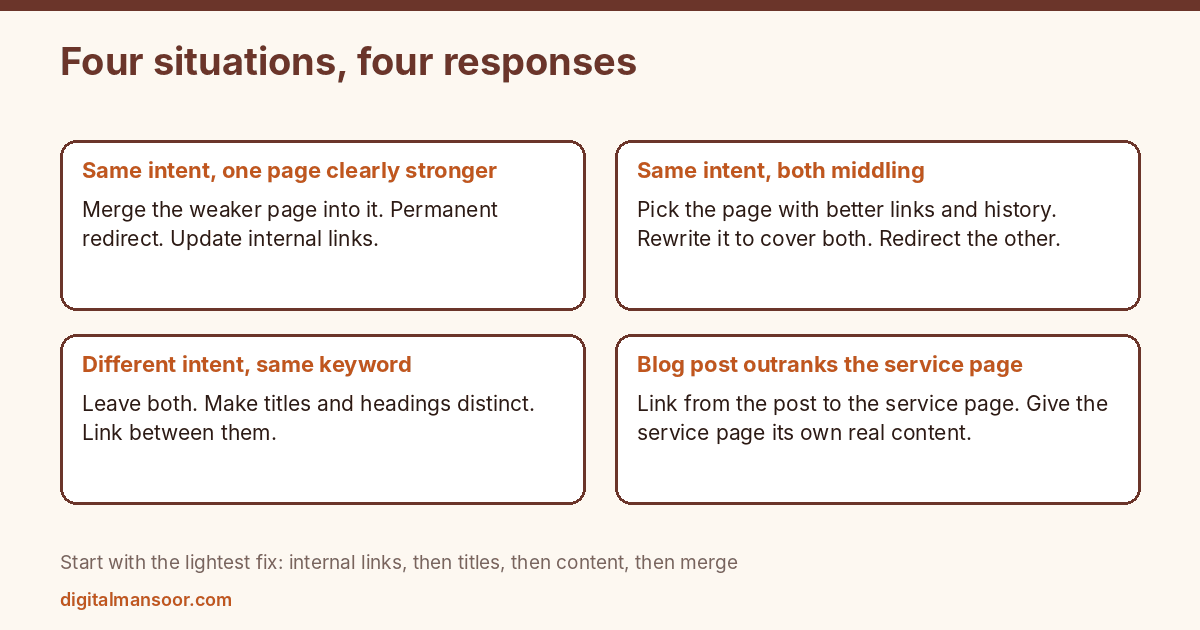
Four situations and what to do in each
Two pages, same intent, one clearly stronger
Merge the weaker page into the stronger one. Move any useful content across, then redirect the old URL to the new one with a permanent redirect. Google’s canonical documentation lists redirects as a strong signal for choosing the canonical, which is why this is the cleanest consolidation. Update internal links that pointed at the old URL so they go straight to the survivor.
Two pages, same intent, both middling
Pick the one with better links, better history or a cleaner URL, and treat it as the winner. Rewrite it to cover everything both pages offered, then redirect the other. Expect a few weeks before rankings settle. Google doesn’t publish a timeline.
Two pages, different intent, same keyword
Leave them alone. Check that titles and headings make the difference obvious, so a searcher and Google can tell which page fits which need. Link from one to the other where a reader would plausibly want both. A service page and a how-to guide on the same subject usually fall here.
One page keeps losing to a page from another section
This happens when a blog post outranks your service page for a commercial query. Don’t delete the post. Add a clear link from the post to the service page near the top, and make sure the service page has its own distinct content, not a thin sales pitch. If the query is commercial, the service page should be the target and the post should support it.
Fixes ranked from light to heavy
Start with the lightest fix that could work.
- Change internal links. Make the page you want to win the destination for anchor text containing the target phrase, and stop using that phrase to link to the other page.
- Retitle the weaker page. Rewrite its title and H1 around a different angle so it stops presenting as an answer to the same question.
- Differentiate content. Narrow the weaker page to a subtopic, a different audience or a different stage of the decision.
- Merge and redirect. Combine the pages and send the old URL to the new one.
- Use a canonical tag. This suits near-duplicate pages that must stay live, such as product variants, but Google treats a canonical as a hint. A redirect is the stronger signal.
- Noindex the weaker page. Only for pages that serve visitors but shouldn’t be in search, like filtered lists.
Skip deleting pages that have links pointing at them. A redirect keeps most of the value, while a 404 throws it away.
Where cannibalization comes from
Most cases trace back to a few causes, and fixing the cause stops new cases appearing.
Publishing without a keyword map. If nobody records which page owns which topic, writers produce a fresh article on a topic you already covered. A simple sheet with one row per page, its target phrase and its intent solves most of this.
Old posts and new posts on the same subject. Annual updates published as new URLs are a common source. Update the original instead.
Tag and category archives. On a blog, archive pages can rank for the same terms as your posts. Check whether they are indexed and whether they add anything.
Location or service pages with swapped words. Pages that differ only by a city name read as near-duplicates, and Google’s spam policies warn about doorway pages built this way. Make each one carry unique detail, or fold them together.
What not to do
Don’t treat a rank tracker’s cannibalization flag as proof. Tools list every keyword with more than one URL, including brand queries, where multiple results from your site are normal and welcome.
Don’t merge pages purely to reduce page count. A merge that creates a 6,000 word page nobody reads solves nothing. If the combined page serves two audiences, keep two pages.
Don’t make five changes at once. Change one thing, wait several weeks, then look. Otherwise you won’t know which change moved anything.
And don’t chase this before the basics. If a page sits at position 40 because it has no links and thin content, fixing cannibalization won’t lift it.
Prevent it going forward
Before writing any new article, search your own site for the topic. Check the sheet of pages and intents. If a page already answers the question, update that page. If your new angle serves a different reader or a different stage, write it and link the two.
Review the sheet when you plan new content. This is also why a content plan built around intent helps. If you want one built for your site, my content strategy SEO consulting page explains how I approach it.
The topical authority guide covers how supporting pages should link to the page you keep. If you want an outside review of which page owns which query, that is part of my content strategy SEO service.
Quick answers
Does cannibalization hurt rankings?
It can, when two pages share an intent and neither is strong enough to win. Google’s own comments suggest multiple URLs ranking is not harmful by itself, so confirm the problem before you fix it.
How long until a fix shows results?
Google doesn’t publish a timeline. Allow several weeks and watch impressions and position for the surviving URL.
Is it ever fine to have two pages for one keyword?
Yes, when the intents differ, such as a guide and a service page. Make the difference obvious in titles and headings.
Leave a Reply