Last updated on November 16th, 2026 at 01:13 pm
If your Google Business Profile is suspended, you get one appeal per decision, and Google tells you not to create a new profile for the same business. Those two rules shape everything below. Rush the appeal or start a fresh listing, and you can turn a fixable problem into a permanent one.
This guide covers fixes only: working out which kind of suspension you have, finding the cause, repairing it, and filing an appeal with evidence that matches. It does not cover how to set up a profile safely, which is a different job.
Work out what state your profile is in
Google’s help page uses the words suspended, disabled and restricted. It says a removed profile is hidden from the public, and its owner and managers can’t act on it. If your account is restricted, the profiles it manages are suspended, and you can’t create or claim others.
You will see “soft” and “hard” suspension in blog posts. Google’s own page doesn’t use “soft suspended”. Whitespark and BrightLocal use the term for a disabled listing that still shows publicly but has lost verification or owner control, and “hard” for a listing that vanishes from Search and Maps. Treat those labels as industry shorthand and check what your own dashboard and email say.
The distinction matters because the route differs. A listing that has lost verification may only need re-verification. A removed listing needs an appeal. An account restriction needs its own appeal first.
Find the stated reason before you touch anything
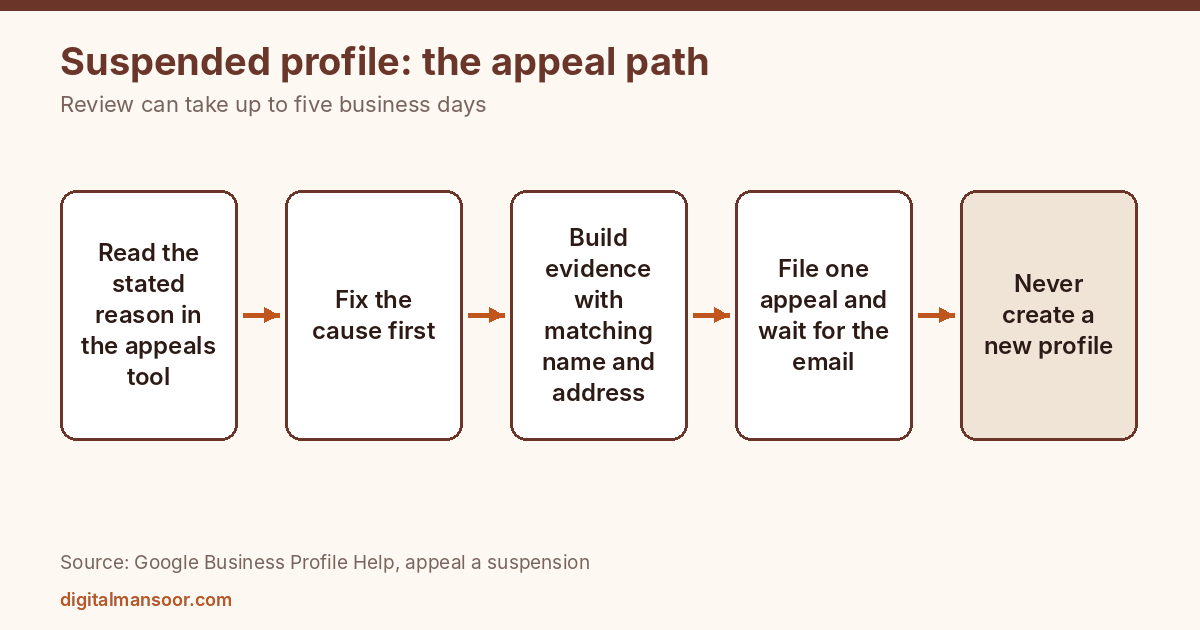
Open the Business Profile appeals tool while signed in to the account linked to the profile. Select the profile and the suspension decision. Google shows the date, the stated reason, the linked policy, whether you can appeal, and the current status.
Read that reason carefully. Two things can happen here. The decision may say the profile can’t be appealed, and then the tool tells you so. Or the reason may be vague, in which case you compare your profile against Google’s guidelines line by line.
Write down the reason and the date before you edit anything. Google’s page also advises you to confirm the profile meets all guidelines before you appeal. That means fixing first.
Match the likely cause to the fix
Google’s page doesn’t list specific violations, but the guidelines it points to do state the rules. These are the usual mismatches and the repair for each.
The address is a virtual office or rented mailbox
The guidelines say a virtual office isn’t eligible, and a rented mailing address doesn’t qualify if the business doesn’t operate there. They also reject P.O. boxes and mailboxes at remote locations. If this is your problem, there is no clean fix with the same address.
Your options: move the profile to a real location where you operate during stated hours, or convert it to a service-area business and hide the address if you have no customer-facing site. Then appeal with proof of the real location.
The name carries extra words
Google says the name should be the real-world name on your signboard, website and stationery. Taglines, store codes, hours, phone numbers, URLs and product or location details should go. Change the name back to the exact form on your signage, then appeal. Keep a photo of the signboard.
The wrong categories or the wrong business type
Categories should complete “This business is a…” and should be the fewest needed. Remove categories that describe services or keywords. If you set the business up as a storefront but customers never visit, switch to service-area and hide the address.
The phone or website points somewhere odd
Google says numbers and URLs that redirect elsewhere, including to social media pages, aren’t acceptable. The phone number must be under your control. Replace a call-center or redirecting number with one that reaches the location, and point the website field at a page about that location.
Hours or description break the rules
Descriptions can’t include links, promotions or prices. Fix that text. Make sure hours reflect staffed customer-facing time.
Duplicate profiles for the same business
Google’s guidelines say one profile per location. If you have two, check which one the suspension notice names before you remove anything. Keep the one that holds your reviews and history, and deal with the extra profile only after you understand which decision you’re appealing.
Account-level restriction
If the account is restricted, Google’s page says to submit an appeal on the My accounts page first. After it lifts, appeal the profile. Doing it in the opposite order wastes your single attempt.
Build an evidence pack that matches the profile
Google’s pages list the types of proof: official business registration, a business license, tax certificates and utility bills. The same pages say the name and address on every document should match the profile you’re appealing for.
For an Indian business, these are examples that fit those categories, though Google doesn’t name them: a GST registration certificate, a Shop and Establishment registration, an Udyam registration, or an electricity bill in the business name. I’m mapping these onto Google’s list myself, so confirm which of them Google accepts for your case. A sensible rule is to include documents that show the business name tied to the exact address on the profile.
Mismatches sink appeals. If your GST certificate shows a registered office in another city, it doesn’t prove you operate where the profile says. In that case add a document that does, such as a utility bill for the premises, along with photos of the signboard.
Prepare the folder first. Check every file for legibility and for name and address agreement. Scan to PDF or clear images rather than photographing documents at an angle.
An example of an evidence mismatch
This case is hypothetical. A physiotherapy clinic in Vadodara has a profile showing its clinic address. The owner’s only business paper is a GST certificate that lists the family home in another part of the city as the registered office. The profile is suspended, and the stated reason points to the address.
Sending only the GST certificate fails, because the name matches but the address doesn’t. A better pack adds an electricity bill for the clinic premises, a clear photo of the signboard and street frontage, and a one-line explanation that the registered office differs from the place where patients are seen. Each file now supports the specific claim the reviewer needs to check.
If you operate from several documents with different addresses, write down which address belongs to which purpose before you assemble anything. Confusion on your side shows up as confusion in the appeal.
File the appeal
The steps, per Google’s appeal page, are short. Sign in to the right account and open the appeals tool. Confirm the profile. Select the suspension decision and read its details. Attach supporting files if you wish and explain why Google should reinstate the profile. Tick the readiness box and submit.
Keep the explanation short and factual. State what the cause was, what you changed and which documents prove it. There is no reward for length, and a reviewer reads facts faster than a story.
Some vendor guides, including Wiremo’s, quote a rule that once you open the evidence form you have 60 minutes to submit it. I didn’t see that in the Google appeal page I read, so I can’t confirm it. The safe habit is the same either way: have the files ready before you open the form.
What not to do while waiting
Google’s page says not to submit multiple appeals for the same issue before getting a decision. It also says not to create a new profile for the same business.
Beyond that, avoid editing the name, address or categories again while the appeal sits. A moving target makes it harder to match your evidence to what Google sees.
Google says appeal reviews can take up to five business days and that it emails the decision. The suspension page itself gives no timeframe for reinstatement, so don’t plan around a promise. Check the status inside the appeals tool.
If the appeal fails
The tool may show “Not Approved”. Here Google’s pages seem to pull in different directions. The appeal page says you can submit each appeal only once, so a denial generally ends your appeal option for that decision. The suspension page says that after a denial, you may ask for an additional review with new evidence.
I can’t reconcile those two statements from the pages alone. Read the message in your own appeals tool, because it will show whether another route is open. If it is, return with evidence that fixes whatever the first pack lacked, such as a document with the right address.
Do not respond by creating a new profile. Google lists that as something to avoid.
After the profile returns
Reinstatement ends the appeal, but not the risk. Re-read the profile against Google’s guidelines the day it comes back, because the same mismatch can trigger another decision. Check the name against your signboard, the address against your premises, and the categories against the “This business is a…” test.
Keep a dated copy of the evidence pack and a screenshot of the reinstated profile. If anything changes later, you can see what Google accepted. Limit the number of people with owner access, and write down who made each major edit, since Google’s page notes that suspending an account can affect the profiles it manages.
Multiple suspended locations
If you manage ten or more suspended locations, Google’s page describes a bulk reinstatement route that needs a spreadsheet listing each Business Profile ID. You get one email decision for the profile you selected in the tool, and the tool doesn’t update the status of the others. So track every location yourself in a sheet.
A note on outside help
The appeals tool is the official route in the help pages I read, and those pages mention no other. If someone claims an inside contact at Google who can approve your reinstatement, be careful. I can’t verify that such contacts exist, and nothing in Google’s documentation suggests it.
If you want someone to review the evidence pack first, that is part of my local SEO service. The local SEO content generator can help you draft location copy that matches the profile.
Quick answers
How long does reinstatement take?
Google’s appeal page says reviews can take up to five business days. The suspension page gives no timeframe, and individual cases vary.
Can I open a new profile while mine is suspended?
Google tells you not to. Use the appeal instead.
Will I lose my reviews?
Google hides a removed profile from the public, so customers can’t see your reviews while it stays suspended. Whether they return depends on reinstatement, and Google’s pages I read don’t promise it.
Do I need an agency?
Google’s pages describe a tool the profile owner can use directly. An agency can help gather evidence, but it can’t replace the correct documents.
Next step
Open the appeals tool today and write down the stated reason and date. Then check that reason against Google’s guidelines before you gather a single document. If you want help with a profile or a wider local plan, see my local SEO expert page.
Leave a Reply