Last updated on November 16th, 2026 at 01:13 pm
Google business profile optimization starts with eligibility, not keywords. Google’s guidelines say a virtual office isn’t eligible, and a rented mailing address doesn’t qualify if you don’t operate from it. In India, where coworking addresses and registered-office addresses are common, that rule decides whether your profile survives, long before categories or photos matter.
This guide covers setup in the order that avoids rework: check eligibility, enter the details the way Google expects, choose categories and services, verify, then add the content that makes the profile useful. It stops at setup. Suspension and recovery are a separate problem with their own article.
Check eligibility before you create anything
Google says businesses with a physical location customers can visit, or that travel to customers, can create a profile. Online-only businesses and freelancers with no customer-facing location don’t fit.
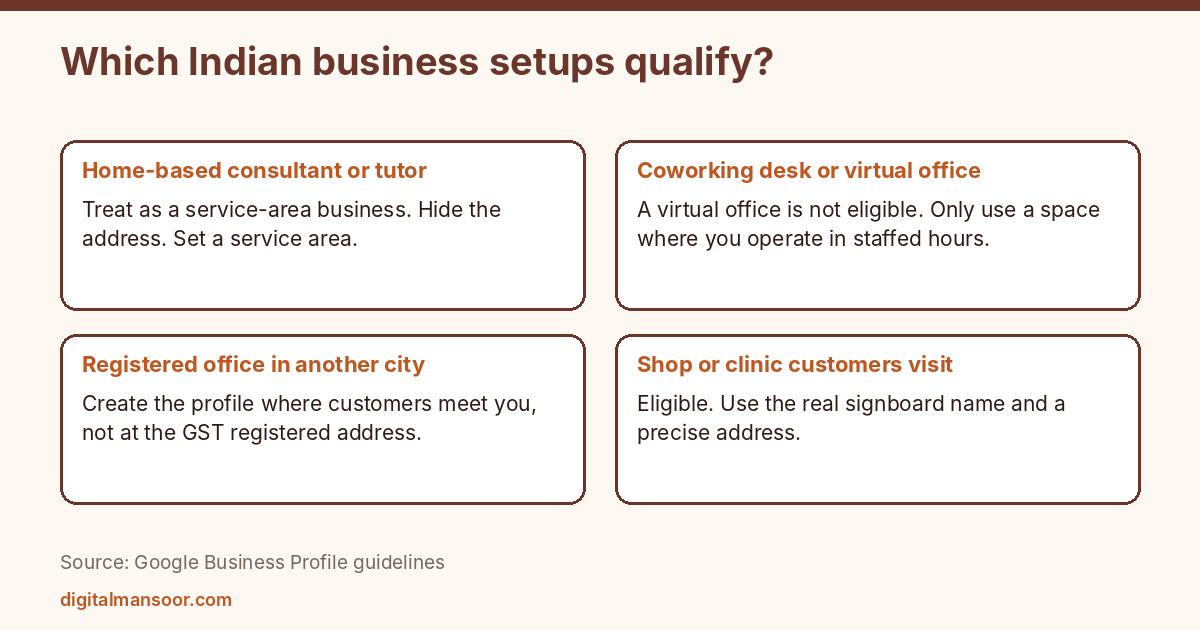
Three Indian situations cause most of the trouble.
A home-based consultant, tutor or designer who serves clients at their homes or online. Google treats this as a service-area business. If customers don’t visit you, hide the address and set a service area instead.
A business using a coworking desk or virtual office address. Per the guidelines, a virtual office isn’t eligible, and a rented mailing address doesn’t qualify if the business doesn’t operate there. If you actually run from a staffed coworking space during stated hours, your position is better, but check the wording against your case. If you only rent the address for paperwork, don’t use it.
A business with a registered office in one city and operations in another. Create the profile for the location where customers meet you, not the one on your GST certificate.
Enter the name, address and phone exactly as they exist
Business name
Use the real-world name shown on your signboard, website and stationery. Google tells you to leave out taglines, store codes, hours, phone numbers, URLs and product details. Adding “Best Dentist in Ahmedabad” to a clinic name is the standard mistake, and it’s the type of edit that gets profiles flagged.
One rule matters in India in particular: don’t repeat the same name in multiple scripts or languages. If your signboard shows the name in English and Gujarati, pick the version customers see most and use only that one.
Address
Use a precise, real address. Google doesn’t accept P.O. boxes or mailboxes at remote locations. Put the physical address in Address Line 1 and the suite or floor in Address Line 2, and keep URLs and keywords out of both lines.
A vendor guide on setup in India suggests including the floor, the building name and a landmark so the pin lands correctly. I treat that as practical advice, not a Google rule. Check the map pin yourself after saving, because Google lets you drag it, and a pin on the wrong lane in a dense market area loses customers.
Keep one profile per location. Branches with separate staff each get their own.
Phone and website
Google prefers a local number that connects to the location over a central helpline. The number must be under your direct control, and it shouldn’t redirect elsewhere. A mobile number is fine as long as someone answers it during your hours. Your website link should open a page about this location, not a social media page.
Pick categories and services with care
Google’s advice is to choose the fewest categories needed to describe your core business, as specific as possible. The test it gives is that a category should complete the phrase “This business is a…”. Services, products and keywords don’t go in categories.
So a clinic that treats teeth picks Dentist as the primary category. Teeth whitening, root canal and braces belong in the services list, not as extra categories. Adding categories you don’t really fit is the quickest way to dilute relevance.
Look at what the three businesses ranking above you chose. You can see this in their profiles in Maps, or with a category-viewer extension. Don’t copy blindly, but if all three use a category you hadn’t considered, that’s worth a look.
After the primary category, add secondary ones only for real, separate lines of business. A shop that sells mobile phones and also repairs them might have a sales category and a repair category. A shop that sells phones and happens to stock covers should not list a cover category.
Services and products
Add each service as its own entry with a short description. Add a price only if you can keep it accurate. Google says the business description must not include links, promotions or prices, so keep prices to the services and products section. For example, an entry might read “Consultation, ₹500 per visit”. That figure is invented for illustration. Use your real fee, and update it when it changes.
Name services the way customers say them. “Teeth cleaning” matches more searches than “oral prophylaxis”. If customers in your city mix English and Hindi words, use the version they type.
Write the description once and write it well
Keep it relevant and free of links, promotions and prices, per Google’s rules. Say what you do, where, and who you serve, in plain sentences. Mention the neighbourhood and nearby landmarks only where they help. A list of every area you can think of reads as spam and gains nothing.
Skip claims you can’t support, such as “best” or “number one”. Google doesn’t forbid superlatives in a description by name, but they add nothing a searcher can use, and a customer will check them against your reviews.
What a finished profile looks like
Here is an illustrative profile for a dental clinic in Navrangpura, Ahmedabad. None of it is a real business, and the details exist only to show how the pieces fit.
The name matches the signboard: the clinic’s name and nothing else. The primary category is Dentist. The address has the building and floor on Address Line 1 and Address Line 2 for the suite, with the pin dragged to the right gate. The phone is a landline that reception answers, and the website link opens the clinic’s page for this location.
Services include teeth cleaning, root canal treatment, braces and wisdom tooth removal, each with a one-line description. Hours show the lunch break and a closure on Diwali day. The description says what the clinic treats, who it serves and which part of the city it sits in, with no links or prices.
Compare that with a profile that adds “Best Dental Clinic” to the name, lists six categories and puts a mobile number that nobody answers. The second one will look busier on paper and perform worse in practice, and it risks being edited or flagged.
Google business profile optimization after the first week
Setup gets you listed. The ongoing work is smaller than most agencies suggest. Check once a month that hours, phone and services still match reality. Answer new reviews. Add photos when something changes, such as a renovation or a new service.
Watch for edits you didn’t make. Google lets users suggest changes to listings, and a wrong phone number or moved pin can slip in. Opening the profile and reading it takes two minutes, and it catches problems before customers do.
Check your Performance section for calls and direction requests, and compare month to month. Treat those numbers as directional. Google doesn’t publish how they’re counted in the pages I read, and a drop in one month may reflect season, not quality.
Hours
List regular customer-facing hours. If you close for lunch, show the break. Set special hours for festivals such as Diwali or Uttarayan, because customers do plan around them and a wrong “open” status leads to bad reviews. Appointment-only businesses can leave hours out, per Google’s list of exceptions.
Verification
You can’t pick the method. Google’s help page says phone or text, email, live video call or postcard, and that Google decides which are available for each business. The India help page recommends video when the business qualifies. Google says a review can take up to five business days.
Prepare for video before you start. Be at the premises with a charged phone. Show the exterior signage and street, then the interior, then proof you run the place, such as equipment, a work area or a document with the business name. Vendor guides advise recording one continuous clip without edits. That’s advice, not a Google rule.
Don’t change the name, address or category while verification is pending. Several vendor sources say edits can reset a postcard code, but Google doesn’t say so in the pages I read, so I’d treat it as a precaution.
Reports on whether postcards still exist conflict. Some vendors say they’ve been phased out, and others say they remain for certain businesses. Go with whatever your own verification screen offers.
Add photos and reviews after verification
Upload real photos of your storefront, the inside, your team and your work. Skip stock images and photos you don’t own. Google has a separate content policy for photos and videos, which I didn’t review for this guide, so read it before uploading anything unusual.
For reviews, ask real customers after a real transaction and send them a direct link. My Google review link generator builds the link in one step. Don’t offer money or gifts in exchange for reviews, and don’t write reviews yourself or ask staff to. Reply to every review, including the bad ones, in your own voice.
Multiple branches
Google says separate locations with separate staff and service areas each get their own profile, and chains should keep consistent names and categories. If you run three clinics in three parts of the city, each gets a profile with its own address, phone and hours. Don’t create one profile for all three and don’t copy-paste the description. Each location should have a page on your website that the profile links to, so a customer from Satellite lands on the Satellite page, not a generic homepage.
A setup checklist you can finish in one sitting
- Confirm you serve customers at a real location or travel to them.
- Match name, address and phone to your signboard and website.
- Choose one primary category and only the secondary ones you really need.
- Add services with short descriptions.
- Write a description with no links, prices or promotions.
- Set regular and festival hours.
- Verify using the method shown.
- Upload real photos and share your review link.
Profile setup is one part of my local SEO service. Your website markup should match the profile, as covered in schema markup for SEO.
Quick answers
Does Google Business Profile cost anything?
Creating and managing a profile is free. I haven’t seen Google charge for the core listing.
Can I have a profile without a shop?
Yes, as a service-area business, if you travel to customers. Hide the address.
Can two businesses share an address?
Separate businesses can exist at one address in some cases, such as a building with several clinics. Each needs its own real-world operation there.
How long until the profile shows in Maps?
Google gives a review time of up to five business days for verification. After that, no schedule is published.
What to do next
Open your profile and read the name, address and categories aloud next to your signboard. Any difference is the first thing to fix. For a wider local plan that includes citations, pages and reviews, see my local SEO expert page.
Leave a Reply