Search Console shows a few hundred URLs under “Crawled currently not indexed”, and a few of them are pages you care about. First question: do you care about enough of them to act? Google’s own help page says this status is common and doesn’t always signal a problem.
The crawled currently not indexed status means Google fetched the page and decided not to add it to the index. Many other indexing statuses point to a technical error you can patch with a setting. This one records a decision, and the useful work is figuring out which of five reasons sits behind it for your pages.
What Google says the status means
The Page indexing report help page defines it in one line: the page was crawled by Google but not indexed. It adds that Google doesn’t index every page, so seeing the status is normal. The page tells you to worry only if important pages show it, and to use the URL Inspection tool to rule out page-level problems such as robots.txt blocks.
It also draws a line against a similar status. “Discovered, currently not indexed” means Google found the URL but hasn’t crawled it yet. Google says it likely wanted to crawl the URL but expected the crawl to overload the site, so it rescheduled, which is why the last crawl date is empty.
| Status | Where the pipeline stopped | Look first at |
|---|---|---|
| Discovered currently not indexed | Before crawling: Google knows the URL, hasn’t fetched it | Server capacity, number of URLs, internal links, sitemap hygiene |
| Crawled currently not indexed | After crawling: Google fetched the page and left it out | Page value, duplication, internal links, overall site quality |
That split of causes comes from SEO practitioners and community guides, not from Google’s help text, so treat it as a working rule. It also matches how Google’s John Mueller described the two statuses: for the first, Google knows the pages exist but hasn’t visited, and for the second, it visited and didn’t put them in the index.
One more note from the help page: sites with fewer than 500 pages usually don’t need this report. For a small site, a site: search plus URL Inspection on your key pages tells you most of what you need.
Start by asking whether the URL deserves to be indexed
Not every URL should be in the index, and a lot of “problems” in this report are Google making a reasonable call. Look at the list before you look at any single page. These URL types often land here and often should stay out:
- Internal search result pages and filter combinations
- Tag and archive pages that repeat post excerpts
- Paginated pages deep in a series
- Parameter URLs, such as tracking or sorting variants
- Near-identical location or service pages that differ only by a city name
If most of your flagged URLs fall into those groups, the report is working as designed. Block or noindex what you never want indexed, and move on. Your effort belongs on the pages that earn money or links.
Then sort the rest. Export the flagged list, mark each URL as keep, merge or drop, and handle the keep group first.
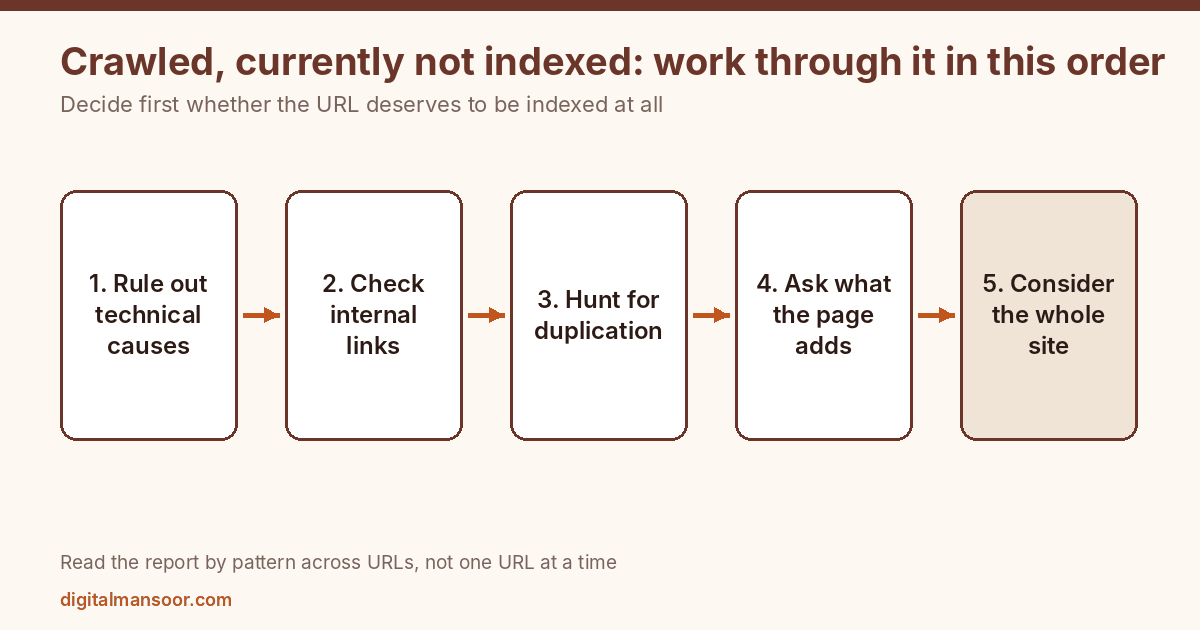
Step 1: rule out the technical causes
A short technical check costs little and sometimes ends the investigation. Open URL Inspection for a flagged page and look at what Google saw. Confirm that the page returns a normal 200 status, that no noindex directive sits in the HTML or HTTP header, and that robots.txt allows the crawl. You can test the rules with a robots.txt checker.
Compare the rendered page against what you see in a browser. If your main content only appears after JavaScript runs and Google’s rendered view is thin or empty, you’ve found the cause. Check that the canonical tag points to the page itself, because a canonical pointing elsewhere tells Google the page isn’t the preferred version.
Also check for soft 404 patterns, meaning pages that return a 200 status but display “no results” or near-empty content. Google can treat those as errors even though the server says everything’s fine.
Step 2: look at internal links
A page with no internal links is an orphan. Google has little reason to rate it important. Check how many links point to each flagged URL using a crawler or your CMS. If the answer is zero or one, that’s likely part of the story.
Add contextual links from relevant pages that already get crawled often and rank. Your homepage, top service pages and best posts qualify. Use descriptive anchor text that says what the target page covers. Footer links and long link lists carry less meaning than a sentence that explains why the reader should click.
This is the cheapest fix in the list and it fits both statuses, so do it early. It won’t rescue a page Google judges to be worthless, though.
Step 3: hunt for duplication
If five pages answer the same question in nearly the same words, Google doesn’t need all five. Search a distinctive sentence from the flagged page in quotes and see what else appears. Look at your own site for sibling pages, old versions, and parameter variants.
When you find overlap, consolidate. Merge the weaker page’s useful content into the stronger one, redirect the retired URL with a 301, and update internal links. Leaving both live and hoping Google chooses well keeps the problem alive. Pick the winner yourself.
Step 4: ask what the page adds
This step often decides the outcome. People skip it because the answers hurt.
Google’s guidance on creating helpful content asks whether a page offers original information, reporting, research or analysis, and whether it provides a substantial, complete or comprehensive description of the topic. A page that restates what ten others already say gives Google no reason to spend index space on it. Google’s own optimization guide uses the term non-commodity content for pages that offer something others can’t copy by rewording.
Read the flagged page the way a stranger would. What can a reader learn here that they can’t learn from the top three results? If the answer is “nothing”, the page needs one of three things: original evidence, such as data, tests or first-hand experience; a narrower focus that serves a distinct search intent; or removal.
Adding 500 words of padding doesn’t count. Neither does rewriting the same points with different adjectives. Pages that were generated at scale often fail this test across the board, and Google’s spam policies say scaled content abuse, meaning many pages produced primarily to rank without adding value, is a violation whether a person or a machine wrote them.
Step 5: consider the whole site
Mueller has said that when Google decides what to index, quality covers more than the text of one article. According to coverage of a Google Search Off the Record discussion, he described it as the quality of the overall website, including layout and design. I’m relying on a secondary write-up there, so listen to the episode before quoting him.
The practical meaning: if hundreds of thin pages dominate your site, the good ones inherit doubt. Pruning can help. Remove or consolidate pages that serve nobody, return 404 or 410 for pages with no replacement, and redirect pages that do have a close successor. Then keep your sitemap limited to URLs you actually want indexed.
Be patient. Site-level reassessment is slow, and nobody outside Google can tell you how long it takes.
Read the report by pattern, not by URL
Export the flagged list and group it by folder or template. Put /tag/ URLs together, then /category/, then parameter URLs, then your service pages and posts. One page failing means a page problem. Forty pages in the same folder failing means a template, a duplication pattern or a section of the site that adds little.
That grouping also protects you from wasting a week on a single stubborn URL. If the stalled group is all thin location pages, fixing one of them teaches you nothing about the other thirty-nine. Fix the pattern, then check the group again after Google has recrawled it.
Keep a dated sheet with the count per group. The Page indexing report shows trends, but your grouped counts show whether a specific fix worked.
Asking Google to look again
After you’ve fixed a page, request indexing once through URL Inspection. The help page says indexing is never instant, even when you submit a crawl request directly. Hammering the button won’t change that.
For a group of pages with the same problem, use Validate Fix on the issue in the report. Google says to fix all instances first, then click it, and not to click it again until the current validation has finished. Validation typically takes about two weeks but can run longer, and it only rechecks URLs with known instances of the issue, not the whole site.
What not to do
Don’t submit the same URLs to the indexing request tool every day. Repeat requests are unlikely to help, since the help page says indexing is never instant even when you submit a request.
Don’t build backlinks to a page just because it’s not indexed. If the page lacks value, links point more people at nothing.
Don’t buy “instant indexing” services. I found nothing in Google’s documentation that supports them.
Don’t delete good pages out of panic. Check traffic and links first, and merge rather than delete when a page has any.
Quick answers
How long until a fixed page gets indexed?
Google gives no fixed timeline. Its help page says indexing is never instant and that Validate Fix typically takes about two weeks. Quality changes take longer to reassess than technical ones.
Is crawled currently not indexed a penalty?
Nothing in Google’s documentation describes it as a penalty. It reports a decision about one page and says nothing about a manual action against your site. Check the Manual Actions report if you suspect one.
Should I worry if it’s a small share of my pages?
Google says to worry only when important pages have the status. Check which pages they are before doing anything else.
What to do first
Export the flagged URLs and tag each one keep, merge or drop. Then spend your first week on the keep group: check internal links, compare each page with the best result for its query, and add something only you can add. If the list is long and you can’t tell why, my technical SEO consulting page explains how I run an indexing audit.