Google’s snippet documentation says there is no limit on how long a meta description can be. It also says the snippet shown in results is cut off, typically to fit the device width. Both statements are true at once, which is why meta description length causes so much argument.
So the useful question is not “how many characters are allowed?” It is “how many characters will show, and does it matter?” The answer to the second part turns out to be less than most SEO checklists suggest.
What Google actually says
The snippet documentation makes four points that matter here.
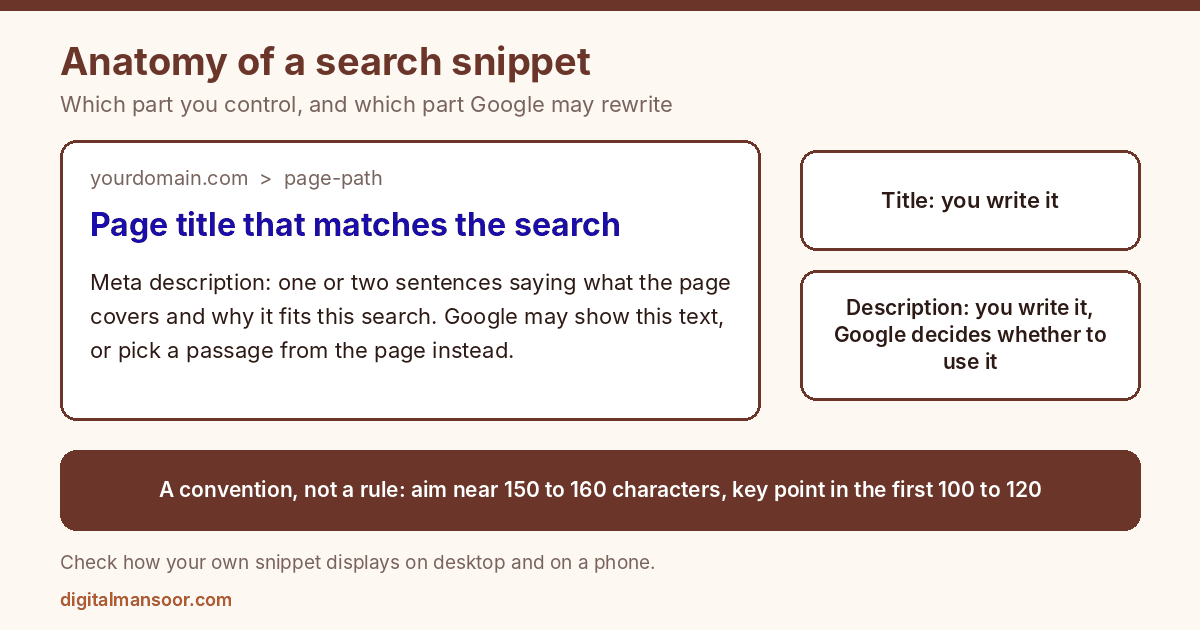
There’s no length limit on the description itself. Google truncates the displayed snippet as needed, typically to fit the device width, so the cutoff depends on screen and layout, not on a fixed character count.
Snippets are primarily created from the page content. Google may use your meta description when it offers a more accurate description than the on-page content would. Otherwise it takes text from the page.
Snippets are designed to emphasize and preview the content most relevant to a specific search. That means the same page can show different snippets for different queries.
And Google doesn’t manually change snippets for individual sites.
Notice what’s missing: any number. Google doesn’t publish a recommended character count. Every figure you’ve read, whether 155 characters, 160 or a pixel width, comes from SEO tools and studies measuring what the results page did on a given day.
How often your description gets used anyway
Ahrefs studied this by comparing hardcoded meta descriptions with the actual Google desktop snippets for 20,000 keywords. It found that Google rewrote the description 62.78% of the time, which means the description you wrote showed up 37.22% of the time on average. The study is dated. Its pages show 2020 revision dates, and Google’s results have changed since, so read the figures as a rough indication.
Two other numbers from the same study are more surprising. Descriptions that were too long by Ahrefs’ measure were rewritten 61.46% of the time, against 63.69% for the rest. In other words, staying within the limit barely changed the chance of being rewritten. And 40.61% of the 192,656 unique descriptions Ahrefs examined were too long, so overlong descriptions are common.
Put those results next to Google’s statement that snippets match the query. A description written for the page’s main query is a poor fit for the long-tail variations the same page ranks for. Google picks a better passage for those. That is the system working as designed.
So what length should you aim for?
I can’t point to a Google number, so here’s my reasoning instead.
A description under about 100 characters is probably wasting space, since there’s room to say more. A description of 150 to 160 characters is the common convention among SEO tools, and it’s a sensible target for desktop. Google truncates to device width, so a phone typically shows fewer characters than a desktop. Put the information that matters most in the first 100 to 120. If the tail gets cut, you lose the least important words.
Both numbers are conventions, not rules, and I’ve seen no Google statement that backs either one. Check them against your own results. Search for your page, look at how the snippet actually displays on desktop and a phone, and adjust. A SERP simulator shows a rough preview before you publish.
That’s the whole length question. After that, put your effort into what the words say.
What Google asks for instead of a length
The documentation’s guidance on writing descriptions is more specific than anything about characters.
Make each description unique to its page. Google suggests site-level descriptions for the home page or aggregation pages and page-level descriptions elsewhere. If you can’t cover every page, prioritize the critical URLs.
Make it descriptive. A good description summarizes the whole page, and a list of keywords does not.
Include key details. Bylines, publication dates, prices and other page facts can be useful to searchers.
Large database-driven sites can generate descriptions programmatically, as long as the results are human-readable and varied.
Three descriptions for the same page
Here’s an illustration for an imaginary page comparing running shoes. The three versions show how little length matters next to content.
The weak version reads: “Running shoes, buy running shoes online, best running shoes India, cheap running shoes, running shoes for men and women.” It runs 120 characters and says nothing about the page. It’s a keyword list, which is the exact thing Google says a good description is not.
A middling version reads: “Shop running shoes for men and women. Free delivery above ₹999. Easy returns within 30 days.” At 92 characters, it’s short but useful, and a shopper would understand the offer. It’s generic enough that competitors could use it word for word.
The stronger version reads: “Compare 12 daily-trainer running shoes by weight, cushioning and price in ₹. Updated for 2026, with notes on fit from our own test runs.” It runs 136 characters, states what the page contains, and includes details a searcher can judge. The last claim only works if the page really contains test notes, and an invented promise will get the description replaced.
Look at the order of information too. The strongest hook, what the reader gets, comes first, and the date and proof come after. If a phone cuts the last 20 characters, the version still works.
Do meta descriptions affect rankings?
Ahrefs’ study says that meta descriptions aren’t a ranking factor but can entice clicks, and clicks lead to traffic. Google’s snippet documentation frames the description as a way to give users a summary and doesn’t present it as a ranking input. Treat the benefit as click-through, not position.
That reframes the work. A better description helps only if your page already appears for the query and enough people see it. So spend your time on pages with real impressions and weak click-through, not on every URL.
When Google shows your page text instead
Since Google builds snippets primarily from page content, the first paragraph under each heading doubles as a backup description. If your intro opens with a greeting or three sentences of throat-clearing, that’s what a searcher may see.
This is a good reason to write the opening lines of a page as if they were the snippet: state what the page covers and give the main answer or offer early. The same habit helps the featured snippet and answer-box work I describe in my guide to answer engine optimization. One piece of writing then serves several surfaces.
Match the description to the search intent
A person searching “meta description length” wants a number and a reason. A person searching “buy running shoes” wants price, range and delivery. The two need different descriptions.
For informational pages, lead with the answer or the thing you’ll teach, then add one proof point, such as a date or a source. For product and service pages, lead with the offer, then add the detail that reduces risk, such as returns, warranty or response time. For comparison pages, lead with what’s compared and the criteria. You can test this against your own pages: read your description cold and ask whether it matches why someone would type that query.
Be honest in it. A description that overpromises gets you a click and a bounce, and Google can swap it for page text anyway.
Other places your description appears
Ahrefs notes that when a page has no Open Graph tags, the meta description may serve as the description in social previews. If your pages get shared, check how a link looks on the platforms your audience uses, and set Open Graph tags where the preview matters. My Open Graph generator can help with the tags.
That’s one more argument against a keyword-list description. It reads badly in a search result and worse in a chat window.
A process that doesn’t eat your week
- Open Search Console’s Performance report and sort pages by impressions. Add the CTR column.
- List the top 20 pages with healthy impressions and a click-through rate below what you’d expect for their position.
- For each, search the page’s main query, read the snippet Google currently shows, and note whether it’s your description or text pulled from the page.
- If Google already rewrites it, look at which passage it chose. That tells you what Google thinks answers the query. You can sometimes improve the page by making that passage stronger.
- If Google shows your description, rewrite it using the three questions below.
- Check CTR after several weeks, comparing like periods, since seasonality and ranking changes will muddy a quick comparison.
The three questions: What will the reader get? What detail would make them trust it? What is the one thing that differs from the other results?
For template sites such as stores and directories, write a formula using fields from each page, like product name, key attribute and price, then review a sample for readability. Google allows this if the output is human-readable and varied.
Common mistakes
Duplicate descriptions across many pages. Every page then pitches the same thing.
Plugin defaults left in place. Many SEO plugins pull the first lines of the post, which may be a greeting and not a summary.
Stuffing keywords. Google says a list of keywords isn’t a good description.
Promising what the page doesn’t contain. Google may use the on-page text when the description isn’t accurate, and visitors who bounce don’t help you either.
Spending hours trimming to the exact character count. Given the rewrite rate above, that’s effort in the wrong place.
Quick answers
What’s the best meta description length?
Google publishes no limit and no ideal length. A common target is about 150 to 160 characters for desktop, with the key information in the first 100 to 120 for mobile. Check how your own snippets display.
Do I need a meta description on every page?
Google’s documentation suggests prioritizing critical URLs if you can’t cover every page. Ahrefs found that 25.02% of top-ranking pages in its study had none, though that dataset is from 2020.
Will Google use the description I write?
Sometimes. Google may use it when it describes the page better than the on-page text would. In Ahrefs’ older study, the hardcoded description showed 37.22% of the time.
Can I reuse one description across similar pages?
Google’s guidance is to make descriptions unique to each page. For a large set of near-identical pages, such as product variants, build the description from fields that differ, so every page still tells the searcher what is specific to it.
What to do today
Open Search Console, sort your pages by impressions and rewrite the descriptions on the five with the weakest click-through. Keep each under about 155 characters, lead with what the reader gets, and mention the one detail only your page has. If you want a review of your whole on-page setup, my on-page SEO consulting page explains the process.