
A website migration checklist has six jobs, and Google documents them in order: prepare the new site, map the URLs, plan the redirects, test, launch, then monitor. Most migration damage comes from skipping the first four and treating launch day as the project.
This site migration checklist follows the order in Google’s site move documentation, adds the checks that page leaves out, and flags where I’m giving an opinion instead of Google’s guidance.
What kind of migration is this?
The type decides which steps apply. Google’s page covers moves where URLs change, and it’s specific about when a tool or step is relevant.
| Migration type | Redirects needed | Change of Address tool |
|---|---|---|
| New domain or subdomain (example.com to example.net) | Yes, old URL to matching new URL | Yes, for all verified variants of the old domain |
| HTTP to HTTPS | Yes | No |
| www to non-www on the same domain | Yes | No |
| New URL paths on the same domain (new CMS, restructure) | Yes, for every changed URL | No |
Google says the Change of Address tool is only for moves between domains or subdomains. It isn’t for HTTP to HTTPS, switching between www and non-www, or moving paths within a domain.
A redesign that keeps every URL the same is a lighter job. You skip mapping and redirects, but the crawl and rendering checks below still apply, because a new template can break things the old one handled.
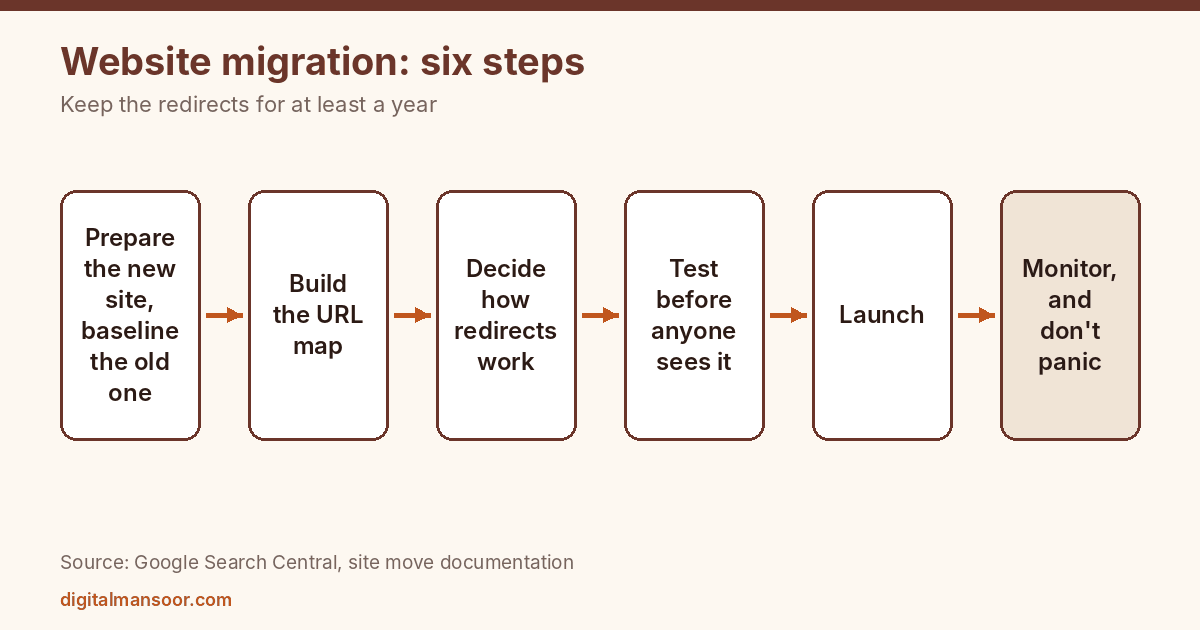
Step 1: Prepare the new site and baseline the old one
Before you touch anything, record how the old site performs. Crawl it and keep the file. Export your top landing pages, your Search Console queries and your backlink list. Save your server logs if you can.
You need this baseline for one reason: when traffic dips after launch, you have to know whether the dip is normal, and you can only tell if you know what normal looked like.
On the new side, Google’s preparation list is concrete. Set up the CMS, transfer images and downloads, configure TLS for HTTPS moves, and set up robots.txt. Verify both the old and new sites in Search Console, including all variants.
Protect the staging site from indexing while you build. Then write “remove noindex and robots blocks” on your launch checklist in capital letters, because Google’s guide explicitly tells you to remove any noindex rules used only for migration. A site that launches with a leftover noindex tag asks Google to remove itself from search.
Step 2: Build the URL map
This is the longest job and the one that earns or loses the most. Google says to build a list of old URLs from sitemaps, server logs, the CMS and analytics, then map each to its new destination.
Use all four sources, because each misses things.
A sitemap lists what you wanted indexed. Server logs show what Googlebot and visitors actually requested. Analytics shows what people landed on. The CMS shows what exists. Old PDFs, retired campaign pages and image URLs often appear in only one of them.
Map pages one to one wherever a close equivalent exists. When a page has no equivalent, send it to the closest relevant category or parent page. Google specifically warns against redirecting many old URLs to an unrelated page, such as the new home page. If a page has no sensible destination and no value, let it return a 404 or 410.
On the new site, update canonical tags, hreflang annotations and internal links so they point at the new URLs. Save the new sitemap, and make a list of the sites that link to your old URLs. That list is for outreach later.
Step 3: Decide how the redirects will work
Google recommends server-side permanent redirects, such as 301 or 308. Client-side redirects are a last resort. Redirect each old URL directly to its final destination.
Chains deserve a warning. Googlebot can follow up to 10 hops, but Google suggests aiming for no more than 3 and fewer than 5. Chains accumulate easily in a migration, because a site that already redirects HTTP to HTTPS and non-www to www adds a hop before the new rule even starts. Collapse them into one step.
For timing, Google says moving everything at once is recommended for small and medium sites, while large sites can move in sections. I’d add a view of my own: if you’re changing the domain, the design, the URLs and the content all at once, you won’t be able to tell which change caused a problem. Where the business allows it, separate them.
Step 4: Test before anyone else sees it
Test the redirects before launch. Google suggests the URL Inspection tool or scripts. Run your whole URL map through a script that follows each redirect and records the final status code, the number of hops and the destination. A redirect checker is enough for spot checks on key pages.
Then check the points where migrations usually break:
- Canonical and robots meta rules point to the new URLs, and migration-only noindex rules are gone.
- The new robots.txt blocks only what you want blocked. If no robots.txt file exists, the server should return a proper 404.
- Every key page has its title, heading, body copy and internal links intact. A new template can silently drop content.
- Structured data is present and matches the visible text.
- Analytics tracking fires on the new site.
- Images, PDFs and other files resolve at their new URLs.
Fix what fails. Then run the full set again. A rollback plan belongs here too. Know in advance who decides to revert, how long the revert takes and what you’d lose.
Step 5: Launch
On launch day, Google’s order is: turn on the redirects, submit a Change of Address if the domain changes, submit the new sitemap, and update links wherever you can.
Sitemaps get special attention. Google says the new sitemap should list only the new URLs, and you can remove the old sitemap afterward. The documentation only says you can remove the old one afterward, so the timing is your call.
Update the links you control: social profiles, email signatures, Google Business Profile, directories, ad destinations and anything in your own content. Then work down the outreach list of sites linking to your old URLs, starting with the strongest. Redirects pass the visitor along, but a link that points directly at the new URL removes a dependency.
Step 6: Monitor, and don’t panic
Google says to track old and new URLs in Search Console (sitemaps, the Page indexing report, search queries), server logs and analytics.
What to expect: Google’s page says temporary ranking fluctuation is normal while it recrawls and reindexes. Medium-sized sites may take a few weeks or more for new URLs to appear, and larger sites take longer. It describes the move as complete only after Googlebot has visited every old and new URL at least once.
So set your expectations in writing before launch. Tell stakeholders that a dip is plausible, how long you’ll wait before treating it as a problem, and what you’ll check first. Google gives no number for “how long”, and I won’t invent one.
Check these in the first days:
- Crawl errors and server errors in the logs, especially 404s for URLs that should redirect.
- Indexing of the new URLs, watching the count rise in the Page indexing report.
- Your top 20 landing pages: do they still rank and still convert?
- Redirects still returning 301 or 308, not 302, after any server or CDN change.
A monitoring schedule you can copy
Google lists what to watch but not how often. This schedule is my own suggestion, so adjust it to your traffic.
On launch day, request a handful of key new URLs in the URL Inspection tool and confirm the redirects fire from a clean browser. During the first three days, read the server logs daily for 404s and 5xx errors on old URLs. In the first week, compare the Page indexing report against your baseline and chase any section where indexed counts aren’t rising.
Over weeks two to four, compare landing page traffic against the baseline for your top 20 pages, and re-crawl the new site to catch broken internal links that crept in with late content edits. After that, move to monthly checks until Google’s coverage of old and new URLs looks settled.
Write the results in one running document. When someone asks in month three why traffic is down, you’ll have dated evidence in place of memory.
Pages you’re not carrying over
Every site migration forces a decision on content that doesn’t fit the new structure. Three choices exist: redirect it to a close equivalent, merge its useful parts into a stronger page and redirect, or let it return a 404 or 410.
Decide with data. Pages with backlinks or steady traffic deserve a redirect to the nearest match. Pages with neither can go. Don’t send them all to the homepage to keep the error report clean, because Google’s guidance warns against it and a pile of irrelevant redirects helps no one.
Keep the redirects for at least a year
Google says to keep redirects for at least one year and to consider keeping them indefinitely for users. The reason is simple: people and other sites still use old links long after Google has processed the move. Removing redirects at six months to tidy up the server config is a mistake I’d class as self-inflicted.
Mistakes worth naming
Redirecting everything to the homepage. Google warns against it directly.
Forgetting the staging noindex. See step one.
Leaving robots.txt blocks in place from the build. The guide says to remove blocks used only during migration.
Using the Change of Address tool for a path or HTTPS change. It isn’t meant for those.
Changing content and URLs together without a baseline. You can’t diagnose what you didn’t measure.
Dropping the old site’s valuable pages because the new design has no place for them. A page that earned links and traffic should have a home on the new site or a redirect to a close equivalent.
Quick answers
Do I lose rankings in a migration?
Google says to expect temporary ranking fluctuation during recrawling and reindexing. It doesn’t promise a drop or rule one out.
How long does a migration take to settle?
Google says medium-sized sites may take a few weeks or more for new URLs to appear, and larger sites take longer. The move is complete only after Googlebot has visited every old and new URL.
Should I use 301 or 302?
Google recommends permanent server-side redirects such as 301 or 308 for site moves. A temporary redirect says the old URL is coming back, which isn’t what you want here.
Your first action
Before you write a single redirect rule, crawl the current site and export the four URL sources Google lists: sitemaps, server logs, CMS and analytics. Merge them into one sheet and count the URLs. That number is the real size of your migration, and it’s usually larger than the page count in your CMS. If you’d like a second pair of eyes on the plan, my technical SEO consulting page describes how I review migrations.