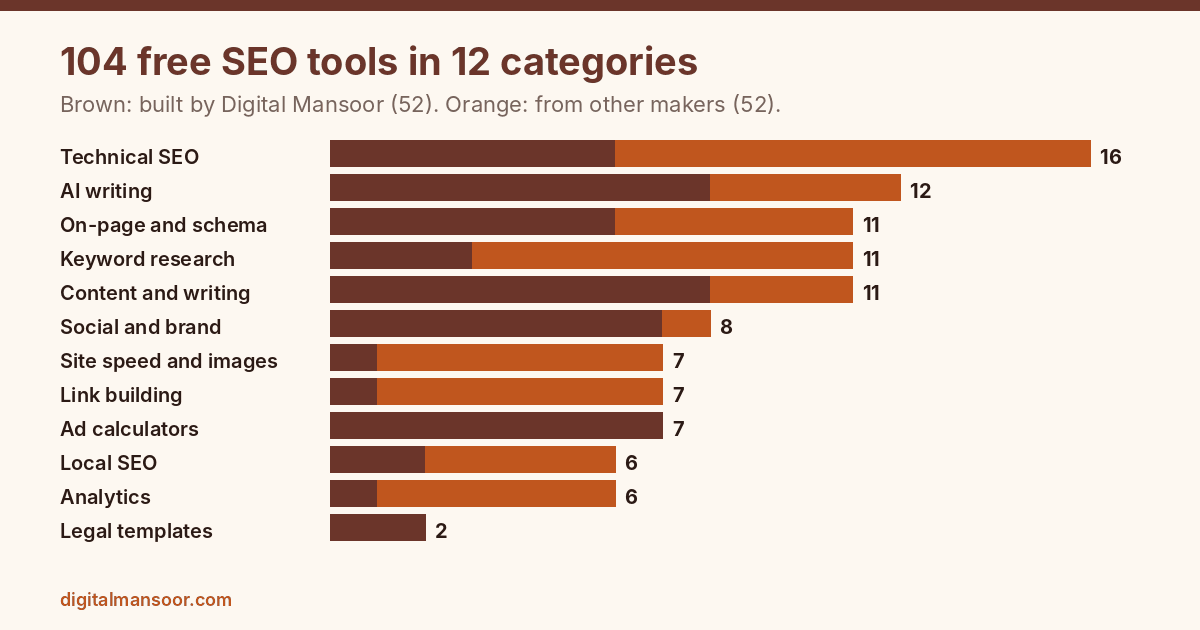
This free SEO tools list has 104 entries. I built 52 of them and host them on this site, and the other 52 come from Google, Microsoft, Ahrefs and other makers. Each one does a specific job, from checking a robots.txt file to calculating ad return, and each has a free way in.
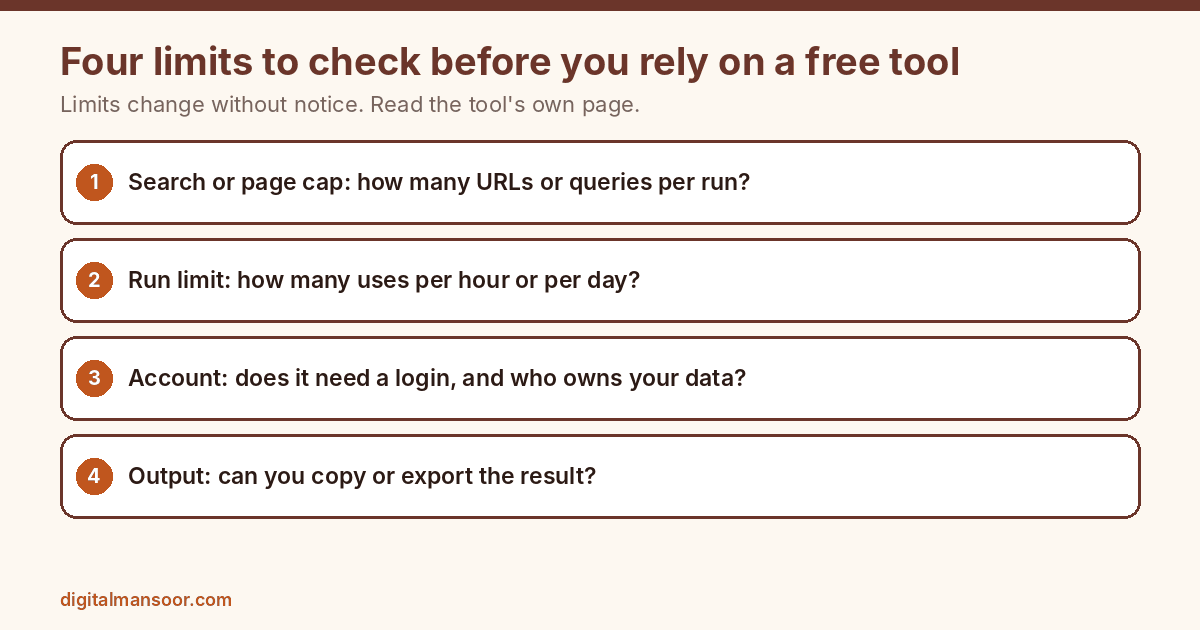
Free rarely means unlimited. Many tools cap searches, pages or daily runs, and those caps change without notice, so I note a limit wherever I could confirm one. I left out tool collections run by other SEO sites and any tool that is paid only. You can also browse my own tools in the free SEO tools hub.
How to use this list
The tools sit in 12 groups by job. Every group opens with a short note, then a table for scanning, then one entry per tool covering what it does and what changes when you use it. The Made by column tells you whether a tool is mine or someone else’s.
I checked official pages in November 2026. Where I could not verify a limit or a feature, the entry says so. Check current terms on the tool’s own site before building a workflow around any free plan.
Free technical SEO tools
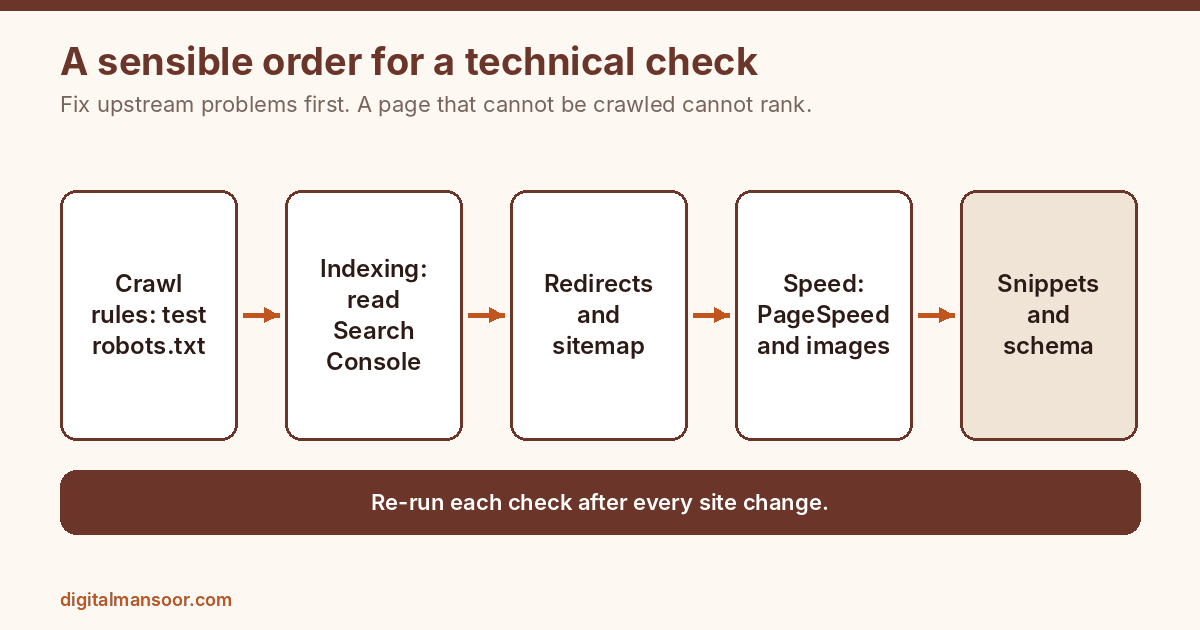
Technical problems cap everything else you do. If Google cannot crawl, render or index a page, better writing will not rescue it. These 16 tools cover crawl rules, redirects, sitemaps, indexing data and server checks, and most of them take under five minutes to run.
| Tool | Best for | Made by | Limit or note |
|---|---|---|---|
| Robots.txt Generator | Writing crawl rules | Digital Mansoor | Free, no signup, runs in browser |
| Robots.txt Checker | Testing crawl rules | Digital Mansoor | Free, paste and test |
| Redirect Checker | Auditing redirects | Digital Mansoor | Up to 10 URLs per check |
| Website SEO Checker | Fast single page check | Digital Mansoor | Free, one URL at a time |
| XML Sitemap Generator | Small site sitemaps | Digital Mansoor | Free, paste URLs and download |
| llms.txt Generator | Optional AI file | Digital Mansoor | Free, optional |
| Google Search Console | Search data for your own site | Free | |
| Bing Webmaster Tools | Bing data and fast URL submission | Microsoft | Free |
| Screaming Frog SEO Spider | Crawling a whole site | Screaming Frog | Free version crawls up to 500 URLs |
| Ahrefs Webmaster Tools | Site audit and backlinks for sites you own | Ahrefs | Free for verified sites you own |
| Seobility | Scheduled crawls with a free account | Seobility | Free plan with limits |
| Chrome DevTools | Inspecting what the browser actually receives | Built into Chrome | |
| Wayback Machine | Seeing old versions of pages | Internet Archive | Free |
| IndexNow | Telling supporting engines about new URLs | Open protocol | Free |
| W3C Markup Validation Service | Checking HTML syntax | W3C | Free |
| SSL Labs Server Test | Checking HTTPS setup | Qualys | Free |
Robots.txt Generator
Build a robots.txt file without memorising the syntax. You choose user agents, add allow and disallow paths, and flip five switches for AI crawlers. Four presets (allow all, WordPress, online store, block all) give a new site a sensible file in a minute. The impact is fewer crawl mistakes on day one.
A store that blocks cart and filter URLs wastes less crawl time, and you decide which AI bots may fetch your pages. One warning: robots.txt is a request to crawlers, not access control, so never rely on it to hide private pages. Test the result with the Robots.txt Checker before you upload it.
Robots.txt Checker
Paste a robots.txt file, enter a URL and pick a user agent such as Googlebot or GPTBot. The tool tells you whether that bot may fetch the page and which rule decided it. This matters because one stray slash can block a whole directory, and nobody notices until traffic drops. I run it before and after every site migration and every CMS plugin change.
It also helps when you want a page kept out of AI crawlers but still open to Google, because you can test both agents against the same file in seconds. Need a file first? The Robots.txt Generator builds one. If pages stay out of the index despite open rules, read my guide to crawled, currently not indexed pages.
Redirect Checker
Paste up to 10 URLs and the tool follows every hop to the final destination. You see each status code, the full chain, loops and dead ends. Redirect chains slow pages and dilute the signal you meant to pass, and they pile up quietly after a redesign or an HTTP to HTTPS switch. Check your old top pages after any migration, then collapse each chain into one 301.
Finding a 302 where a 301 belongs, or a redirect that lands on a 404, takes seconds here and saves weeks of lost clicks. Afterwards, rebuild the XML Sitemap so it lists only final URLs. For a bigger move, follow my website migration SEO checklist.
Website SEO Checker
Enter a URL and the tool reads the title, meta description, H1, canonical, noindex tag, schema, robots.txt and sitemap. Results come back as a fix first list instead of a wall of scores. Use it as triage on a new client page or a page that suddenly dropped. A stray noindex tag or a canonical pointing at another URL explains most sudden losses, and this check spots both quickly.
It looks at one page, so it will not replace a crawler on a large site, but it settles the first question fast. If the URL redirects, follow up with the Redirect Checker. When a canonical looks wrong, my canonical tag guide explains how Google treats it.
XML Sitemap Generator
Paste your URLs, add optional lastmod dates and download a valid sitemap.xml. Upload it to your site root and submit it in Search Console. A sitemap will not force indexing, but it gives Google a clean list of the pages you want found, which helps new sites and pages with few internal links. Keep it to canonical, indexable URLs only.
Including redirected, noindexed or duplicate URLs sends mixed signals, and Search Console will report them. For WordPress sites, an SEO plugin usually builds this automatically, so this tool suits static or custom sites best. Check your crawl rules with the Robots.txt Checker so the sitemap does not list blocked pages. Large sites with indexing problems may need a full technical SEO audit.
llms.txt Generator
Enter your site name, a short summary and your key pages to produce an llms.txt file. The idea is a plain text guide that points language models to your best content. I could not confirm that any major AI service reads the file today, so treat it as optional and cheap, not a ranking lever. The upside is a tidy, curated list of your most important pages, which is useful to write anyway.
If you publish one, link only public pages that return a 200 status, and keep it short. I explain the full picture in my guide to llms.txt. Pair it with a checked robots.txt file so your crawl rules and your llms.txt agree.
Google Search Console
Search Console is the only place that shows how Google itself sees your site: queries, clicks, impressions, average position, indexing status, sitemap processing, Core Web Vitals and manual actions. Verify your domain once and you get first party data no third party tool can match. The URL Inspection tool shows whether a page is indexed and which canonical Google chose. Start here before any paid platform.
If a number in another tool disagrees with Search Console, trust Search Console. It is also where Google tells you about security issues and penalties. My guide to adding social media in Google Search Console shows one useful setup step.
Bing Webmaster Tools
Bing Webmaster Tools gives you search performance, crawl information, sitemap submission and URL submission for Bing. It also includes a site scan and lets you import a site from Search Console, so setup takes a few minutes. Bing sends a smaller share of traffic than Google in most markets, but the data is free and it shows crawl problems from a second crawler.
Verifying your site here also puts you in position to use IndexNow, covered below. Many site owners skip it, which means a small, easy edge over competitors who never set it up.
Screaming Frog SEO Spider
This desktop crawler visits your pages like a search engine and lists status codes, titles, meta descriptions, headings, canonicals, redirects and broken links in one table. The free version stops at 500 URLs, which covers most small business sites in full. Impact is concrete: you export a list of every 404, every missing H1 and every duplicate title and work through it.
I use it at the start of nearly every audit because patterns, such as 300 pages with the same title, appear instantly in a crawl and almost never in manual checks. I turn crawl exports into a fix list in my technical SEO audits.
Ahrefs Webmaster Tools
Ahrefs Webmaster Tools gives site owners a scheduled site audit and backlink data for any property they verify, including referring domains, anchor text and the pages that attract links. The audit flags broken links, redirect problems, missing tags and slow pages across the crawl. The impact is visibility into your own link profile at no cost, which is rare.
Use the backlink report to spot lost links worth reclaiming and toxic looking patterns worth watching. Data covers only sites you verify, so you cannot spy on competitors with it. For that, see the free backlink checker later in this list.
Seobility
Seobility offers a free account that crawls a site and reports technical and on page issues, with a task list ordered by priority. It suits owners who want a second crawler besides Screaming Frog, or a browser based one that does not need installing.
Impact comes from the issue grouping: duplicate content, broken links, thin pages and missing tags appear in one dashboard you can revisit as you fix things. The free plan limits how many pages it checks, so confirm the current allowance on the site before relying on it for a larger project.
Chrome DevTools
DevTools ships inside Chrome and shows the rendered DOM, network requests, response headers, console errors and mobile emulation. For SEO it answers questions a crawler cannot: Is the canonical tag present after JavaScript runs? Which header sets noindex? Why does this image load last?
Press F12, open the Network tab and reload to see status codes and redirects in order. The Lighthouse panel inside it runs audits too. Learning ten minutes of DevTools replaces several paid extensions, and it settles arguments with developers because you can show the exact response.
Wayback Machine
The Wayback Machine stores snapshots of web pages over time. Enter a URL and pick a date to see how it looked, which helps in three common jobs: recovering lost copy after a botched migration, checking what an old domain used to host before you buy it, and seeing how a competitor changed a page before their rankings moved.
Snapshots are not complete, and some pages never got archived, so treat it as a clue, not proof. When traffic falls after a redesign, comparing the old and new page side by side often shows the cause.
IndexNow
IndexNow lets a site notify participating search engines the moment a URL is added, updated or deleted, instead of waiting for a crawl. Bing supports it, and several SEO plugins can send pings automatically. As far as I could confirm, Google does not use it, so it does not replace Search Console for Google.
The impact shows on sites that change often, such as news, stores and listings, where faster discovery on Bing matters. For a small brochure site that rarely changes, the benefit is minor, so set it up once through a plugin and move on.
W3C Markup Validation Service
Paste a URL or code and the validator lists HTML errors such as unclosed tags, duplicate IDs and invalid nesting. Broken markup does not rank or demote a page by itself. It can make parsers guess, which sometimes hides headings, links or structured data from crawlers.
Run it after theme changes or when a page renders oddly in one browser. Expect plenty of warnings on any real site, so fix the errors that affect structure and skip cosmetic ones. It is a clean way to prove to a developer that a template, not your content, caused the problem.
SSL Labs Server Test
Enter a domain and SSL Labs grades the server’s HTTPS configuration: certificate validity, supported protocols, cipher strength and known weaknesses. HTTPS is a light ranking signal and a visible trust cue, but the bigger risk is practical. An expired or misconfigured certificate throws a browser warning that sends visitors away instantly.
Run the test after changing hosts or CDNs, and fix anything below an A grade your host allows. The report is technical, so send it to your host with the specific line items. It takes about a minute to scan, though the test can queue on busy days.
Free site speed and image tools
Speed work pays twice: visitors stay, and Core Web Vitals data improves. These seven tools measure performance and shrink the heaviest files on most sites, which are images.
| Tool | Best for | Made by | Limit or note |
|---|---|---|---|
| Favicon Generator | Brand icon for tabs and results | Digital Mansoor | Free, upload or type letters |
| PageSpeed Insights | Core Web Vitals for one URL | Free | |
| Lighthouse | Repeatable page audits | Free and open source | |
| WebPageTest | Waterfall charts and real device tests | Catchpoint | Free with limits |
| GTmetrix | Performance reports with history | GTmetrix | Free account with limits |
| Squoosh | Compressing images in the browser | Google Chrome Labs | Free, runs locally |
| TinyPNG | Quick bulk image compression | Tinify | Free web upload with limits |
Favicon Generator
Upload a logo or type two letters and the tool outputs favicon.ico, PNG sizes and the HTML tags to paste into your head. A favicon looks minor, but Google shows it beside your result on mobile, and a missing one makes your listing look unfinished. Browser tabs and bookmarks use it too, so it reinforces brand recall.
Use a simple, high contrast mark because it renders at tiny sizes. After pasting the tags, clear your cache and check the tab. Google may take days or weeks to update the icon in results, so do this early.
PageSpeed Insights
PageSpeed Insights reports performance for a single URL on mobile and desktop. It combines lab data from Lighthouse with field data from real Chrome users when enough traffic exists, and lists specific fixes for load speed, layout shifts and responsiveness. Impact comes from the field data section, because it reflects what actual visitors experience, which is closer to what Google uses.
Test your key templates, not just the homepage: a product page, a blog post and a category page often score very differently. Fix the largest issue first, such as an oversized hero image, before chasing small gains.
Lighthouse
Lighthouse is an open source tool that audits pages for performance, accessibility, best practices and SEO. You can run it inside Chrome DevTools, from the command line or as a Node module, or use it through PageSpeed Insights or the Chrome extension. Impact is consistency: the same audit run before and after a change shows whether a fix worked.
Lab scores shift between runs, so test a few times and compare trends, not single numbers. The SEO section is basic, checking items like titles and crawlability, so use it as a floor, not a full audit.
WebPageTest
WebPageTest runs your page from chosen locations and connection speeds and returns a waterfall chart showing every request in order. That view reveals what a score hides: a third party script blocking render, a font loading late, an image requested twice. Impact is diagnosis.
When PageSpeed Insights says a page is slow, this shows which file to fix. Pick a test location close to your audience, since an Indian audience tested from a distant server gives misleading results. The free tier has usage limits, so check the current allowance on the site before planning a large batch.
GTmetrix
GTmetrix tests a page and produces a report with a performance grade, Web Vitals and a waterfall. A free account lets you save reports and compare them over time, which helps when you need to show a client what changed after an optimisation. Test locations and some features depend on the plan, so confirm what the free tier includes today.
Use it as a second opinion next to PageSpeed Insights, not a replacement. When two tools disagree, look for the shared finding, such as the same large image or script, and fix that first.
Squoosh
Squoosh compresses and converts images in your browser, with a live side by side preview so you see quality loss before you save. It supports modern formats such as WebP and AVIF alongside JPEG and PNG, and the file stays on your device. Impact is direct: a 2 MB hero photo can often drop to a fraction of that with no visible change, which improves load time and Largest Contentful Paint.
Work one image at a time, so it suits key banners and feature images better than a library of thousands. Resize to the display width before compressing.
TinyPNG
TinyPNG compresses PNG, JPEG and WebP files through a simple drag and drop page. It strips unneeded data while keeping the image looking the same, and handles several files at once. For a blog with fifty uncompressed screenshots, this is often the fastest win on page weight.
The web version limits file size and batch count, so check the current limits on the site, and an API or plugin exists for automation. Compress after resizing, not before. Keep your originals in a separate folder, because compression is not reversible and you may need the full quality file later.
Free on-page SEO and schema tools
On-page tools shape what searchers see before they click: the title, the snippet, the structured data and the share card. These 11 tools check and preview those elements so you fix them before Google rewrites them for you.
| Tool | Best for | Made by | Limit or note |
|---|---|---|---|
| Meta Title and Description Checker | Title and snippet length | Digital Mansoor | Free, paste and check |
| Google SERP Simulator Tool | Previewing a search result | Digital Mansoor | Free, desktop and mobile preview |
| Open Graph Generator Tool | Social share cards | Digital Mansoor | Free, copy the tags |
| Schema Markup JSON-LD Generator | Structured data without coding | Digital Mansoor | Free, copy JSON-LD |
| SEO Content Analyser | Draft checklist | Digital Mansoor | Free, paste text and keyword |
| Keyword Density Checker | Spotting overused terms | Digital Mansoor | Free, paste text or enter URL |
| Rich Results Test | Checking rich result eligibility | Free | |
| Schema Markup Validator | General schema.org validation | Schema.org | Free |
| Yoast SEO | WordPress titles, sitemaps and basic checks | Yoast | Free plugin, paid version exists |
| Rank Math SEO | WordPress SEO with schema and redirects | Rank Math | Free plugin, paid tiers exist |
| Facebook Sharing Debugger | Refreshing share previews | Meta | Free, needs a Meta login |
Meta Title and Description Checker
Paste a title and meta description and the tool measures length in characters and in pixels. Google sets no fixed character limit and cuts text by width, so the usual 60 and 160 figures are rules of thumb, not rules. The pixel count is the more honest number, since a title full of wide letters truncates earlier than one full of narrow ones. Use it to catch titles that will clip and descriptions that run empty.
Write for the click first, then trim. Google also rewrites many descriptions to match the query, so do not agonise over exact lengths. Then preview the result in the Google SERP Simulator. My guide to meta description length covers what Google says.
Google SERP Simulator Tool
Type a title, URL and description and the tool draws a Google style result in desktop and mobile, light and dark. Seeing the snippet beside a competitor style listing changes how you write it: you notice a title that reads like a keyword list or a URL that looks messy. Google truncates by width and may rewrite your text, so the preview is a guide, not a promise.
Use it when you rewrite titles for pages with high impressions and low clicks, because a better title is one of the cheapest ways to lift click through rate. Check pixel width first with the Meta Title and Description Checker. Rewriting titles across a whole site is core work in my on-page SEO service.
Open Graph Generator Tool
Enter a title, description and image URL and get Open Graph and Twitter card tags with a live preview of the share card. Paste the tags into your page head. Open Graph has no effect on Google rankings. It controls how your link looks on LinkedIn, WhatsApp, Facebook and X, and a clear card earns more clicks from shares.
Use an image around 1200 by 630 pixels with readable text. After changing tags, clear the platform cache with the sharing debugger, because networks keep old previews. Sites on SEO plugins may already output these tags, so check before duplicating. Write the title with the Headline Analyzer first.
Schema Markup JSON-LD Generator
Pick a schema type, fill in the fields and copy valid JSON-LD for your page. Structured data helps search engines understand entities such as an organisation, article, product, FAQ or local business. Mark up only what is visible on the page, since invented or hidden markup can lose eligibility for rich results.
Test every snippet in the Rich Results Test before publishing. Schema does not guarantee a rich result, and Google has reduced some types, so use it for clarity first and display features second. My guide to schema markup for SEO covers which types still matter.
SEO Content Analyser
Paste a draft and a target keyword and the tool scores it against an on page checklist: keyword placement, headings, length, links and readability signals, with a list of what to fix first. Treat the score as a guide, not a ranking prediction. Its value is catching omissions before publishing, such as a missing keyword in the first paragraph or a title that skips the topic. Do not chase 100 percent.
Pages rank because they satisfy the search intent better than the competition, and no checklist measures that. Use it as a final pass after you finish writing for the reader. Pair it with the Keyword Density Checker to catch repetition.
Keyword Density Checker
Paste text or enter a page URL to see how often each word and phrase appears. The tool helps you spot overused terms and confirm your target phrase shows up naturally. There is no ideal density, and Google has said nothing supports a magic percentage, so use this to find repetition that reads badly, not to hit a number.
If one phrase appears 30 times in 800 words, readers will notice before any algorithm does. It also shows which secondary words dominate your page, which reveals when a draft drifted away from its topic. The SEO Content Analyser checks keyword placement as well.
Rich Results Test
The Rich Results Test checks a publicly accessible page and reports which rich results its structured data can generate, with errors and warnings. Run it on every template that carries schema: articles, products, FAQs, local business pages. The impact is avoiding silent failures, because markup that looks fine in code can still be invalid or ineligible. It tests against Google features specifically, so a clean result means eligibility, not guaranteed display.
You can test a live URL or a pasted code snippet, which makes it handy before deploying a change to production. Not sure which types to add? Start with my schema markup guide.
Schema Markup Validator
This validator checks structured data against the schema.org vocabulary itself, not against Google’s feature rules. That makes it a good partner to the Rich Results Test: one tells you whether the markup is valid schema, the other whether Google can use it. Paste a URL or code and review the parsed entities and any errors.
Impact shows in complex setups with nested types, such as an organisation linked to a person and an article, where a missing property is easy to overlook. Use it for types that Google does not display and other systems still read.
Yoast SEO
Yoast SEO is a WordPress plugin that handles title templates, meta descriptions, XML sitemaps, canonical tags and a basic content analysis. The free version covers what most small sites need. Impact comes from automation: once set up, every new post gets sensible defaults, which prevents the common mistakes of missing titles and duplicate pages.
Its green light scoring is a guide, so do not rewrite good sentences to please it. A paid version adds extra features, but you should confirm what the free plugin includes today before deciding. Run only one SEO plugin at a time.
Rank Math SEO
Rank Math is a WordPress SEO plugin with title and description templates, schema options, a redirection manager, sitemaps and a focus keyword checker. This site runs on it, and I set its title, description and focus keyword fields on every post I publish. Impact comes from bundling several jobs into one plugin, which reduces conflicts and page weight.
The free version is generous, but some advanced features sit in paid tiers, so check the current feature list. Do not switch plugins carelessly on a live site, because migrating metadata can drop titles if mapped wrongly. For canonical settings in any plugin, see my guide to URL canonicalization.
Facebook Sharing Debugger
Enter a URL and the debugger shows the Open Graph tags Meta reads, warns about missing or invalid ones and lets you scrape again to refresh a cached preview. Impact is practical: when you fix a share image and Facebook or WhatsApp still show the old one, this forces an update. It also catches problems like an image that is too small or a redirect that breaks the card.
Pair it with the Open Graph generator above. You need a Meta account to use it, and other networks keep their own caches, so check LinkedIn and X separately.
Free keyword research tools
Keyword tools answer two questions: what do people search, and how should I group it into pages? Free tools give directional data, not exact volumes, so use several and trust patterns over single numbers. Here are 11 that cover ideas, trends, questions and clustering.
| Tool | Best for | Made by | Limit or note |
|---|---|---|---|
| Keyword Clustering Tool | Grouping keywords into pages | Digital Mansoor | Free, paste a list |
| Topical Authority Planner | Planning pillar and cluster content | Digital Mansoor | Free, enter a topic |
| Blog Post Idea Generator | Topic and title ideas | Digital Mansoor | Free, enter niche and audience |
| Google Trends | Seasonality and rising topics | Free | |
| Google Keyword Planner | Keyword ideas from Google data | Needs a free Google Ads account | |
| AlsoAsked | Mapping People Also Ask questions | AlsoAsked | Free searches with limits |
| AnswerThePublic | Question and preposition ideas | NP Digital | Free searches with limits |
| Ahrefs Free Keyword Generator | Quick ideas with difficulty | Ahrefs | Free, limited results |
| Soovle | Autocomplete from many sources | Soovle | Free |
| Ubersuggest | Ideas, volumes and basic site checks | NP Digital | Free daily searches, then a limit |
| Keyword Surfer | Volumes inside Google results | Surfer | Free Chrome extension |
Keyword Clustering Tool
Paste a keyword list and the tool groups terms by shared words and topic. Use the groups to decide which keywords belong on one page and which need their own. This helps prevent cannibalization, where two pages compete for the same query and both lose. Grouping by shared words is a fast first pass, not a replacement for judgement.
Before committing, search the main keyword in each group and check whether the results show the same kind of page. If Google shows different page types for two keywords, they likely need separate pages even when the words look alike. Plan the pages in the Topical Authority Planner once the groups look right.
Topical Authority Planner
Enter a topic and the planner maps a pillar page and supporting articles into clusters. A planned cluster gives each page one job and links them logically, which is how a site builds depth on a subject instead of publishing scattered posts. The output is a draft plan, so check each idea against real search demand and your own capacity to cover it well. Start with the pillar and three to five supports, publish, then expand.
Planning before writing also exposes overlaps early, which saves you from creating two articles that fight over the same query. Feed it a list from the Keyword Clustering Tool. My topical authority guide explains the reasoning, and my content strategy service covers done for you planning.
Blog Post Idea Generator
Enter your niche and audience and receive blog topic and title ideas sorted by search intent. It helps when you stare at a blank calendar. The ideas are prompts, so confirm demand in a keyword tool before writing, because a clever title with no searches behind it earns nothing. Save the ideas that fit your plan, drop the rest and look for ones you can answer from real experience. Competitors will not have that angle.
Use the generator for volume, then filter hard: a short list of strong, specific topics beats a long list of generic ones. Group the best ideas with the Keyword Clustering Tool. Planning pages from a template? Read my programmatic SEO guide first.
Google Trends
Google Trends shows how interest in terms and topics changes over time, across locations and by popularity, including what people search for right now. Values are relative, not search volumes, so use it to compare two keywords or spot seasonality, not to size a market. Impact is timing: publishing a festival or tax deadline guide six weeks early catches the climb.
Compare your phrasing against alternatives before choosing a title, and filter by India or a state to see local differences. Check the related queries box for rising terms that tools with monthly data have not caught yet.
Google Keyword Planner
Keyword Planner suggests keywords and shows search volume estimates and competition data from Google. It requires a Google Ads account, and as far as I could confirm, volume appears as broad ranges unless you run active ad spend, so confirm what you see before relying on the numbers.
Its strength is the source: the ideas come from Google itself and include related terms you may not think of. Use it to find phrasing variations and rough demand tiers, then cross check with Search Console impressions for the keywords you already touch.
AlsoAsked
AlsoAsked turns Google’s People Also Ask boxes into a visual tree, showing which follow up questions cluster around a query. That reveals the questions a good page must answer, and the order a reader asks them. Impact is in outlines: instead of guessing at subheadings, you build sections from questions real people ask.
Free searches are limited, so spend them on your main topics. Answer each question directly in one or two sentences under its own heading, then expand. That structure also suits featured snippets and AI answer extraction, which both favour clear, self contained answers.
AnswerThePublic
AnswerThePublic takes a seed term and shows questions, prepositions and comparisons people type around it, drawn from search suggestions. It is good for finding the wording of real queries: how, why, can, versus. Impact is content angle, since question phrasing tells you which format to write, such as a how to, a comparison or a definition.
Free use is capped, so check the current allowance. Treat the output as raw ideas. Many suggestions have almost no volume, so filter with Trends or Search Console before building a page around any single one.
Ahrefs Free Keyword Generator
Enter a seed keyword and the free generator returns a limited set of ideas with a keyword difficulty indicator. It will not give the full dataset a paid account does, but it is enough to test whether a topic is crowded. Impact is speed: in a minute you see rough competition for ten phrases and can drop hopeless ones.
Treat difficulty scores as relative between phrases, not as a verdict on whether you can rank. A newer site can still win on a narrow, specific phrase where big domains have only thin pages on the topic.
Soovle
Soovle shows autocomplete suggestions from several sites at once as you type, such as search engines, video platforms and shopping sites. Different platforms reveal different intent, so a phrase popular on a video site might call for a tutorial, while one from a store suggests buying intent. Impact is variety: you find long tail phrases a single engine would not surface.
The tool shows suggestions without volumes, so pair it with a volume source. It works well early in research when you want wide ideas fast before narrowing the list with data.
Ubersuggest
Ubersuggest returns keyword ideas with volume, difficulty and cost per click estimates, plus domain and content ideas. It is a friendly first tool for beginners. While researching this very list, I hit its daily report limit, so plan on a handful of searches per day on the free tier and save results as you go.
Impact depends on discipline: pick your ten most important seed terms, run them first and export. Volumes from any third party tool are estimates, so compare against your Search Console impressions when you can before trusting them.
Keyword Surfer
Keyword Surfer is a Chrome extension that displays estimated search volume next to Google results and suggests related keywords in a sidebar. Impact is workflow: you see demand while you search, instead of switching tabs. It shows which keywords the top ranking pages also appear for, which hints at the topics your page should cover.
Like all extensions, its numbers are estimates, and I could not verify its current free limits, so check the extension page. Use it for fast checks while writing or planning, not for final decisions on competitive keywords.
Free content and writing tools
Good content tools do small jobs well: measure length, check clarity, compare tone, fix grammar. These 11 tools help you edit faster without changing your voice, which matters more than any score they produce.
| Tool | Best for | Made by | Limit or note |
|---|---|---|---|
| Headline Analyzer Tool | Comparing title options | Digital Mansoor | Free, paste several headlines |
| Readability Checker Tool | Checking reading level | Digital Mansoor | Free, paste text |
| Active to Passive Voice Generator | Voice comparison | Digital Mansoor | Free, paste active sentences |
| Page and Blog Outline Generator | Structure for new pages | Digital Mansoor | Free, enter a keyword |
| E-E-A-T Author Bio Score Checker | Author trust signals | Digital Mansoor | Free, paste a bio |
| Brand Tone and Voice Analyzer | Keeping voice consistent | Digital Mansoor | Free, paste two texts |
| Word, Character and Sentence Counter | Length and repetition checks | Digital Mansoor | Free, runs as you type |
| Case Converter | Fixing text case | Digital Mansoor | Free, one click |
| Hemingway Editor | Spotting dense sentences | Hemingway | Free web editor, paid app exists |
| LanguageTool | Multilingual grammar checking | LanguageTool | Free with character limits |
| Grammarly Free | Everyday spelling and clarity | Grammarly | Free plan, paid tiers exist |
Headline Analyzer Tool
Paste several headlines and compare length, word balance and clarity in one table. Seeing five options side by side makes weak ones obvious: too long, too vague, front loaded with filler. Pick a favourite, then test it on real readers, because a tool cannot know your audience. Impact shows in click through rate.
A headline is the single line most people read, so ten minutes spent comparing options often beats an hour polishing the intro. Keep your target phrase near the start of the title and make the benefit concrete, with a number or a specific outcome where honest. Preview the winner in the Google SERP Simulator.
Readability Checker Tool
Paste text and get a Flesch reading ease score and a grade level. The score helps you gauge whether a piece suits its audience: a guide for small business owners should read easier than a technical white paper. It is a writing guide, not a ranking factor, and Google has no readability score. Impact comes from catching walls of long sentences.
If your score is low, split sentences, swap rare words for plain ones and cut filler. Short does not mean shallow. Aim for the level your reader needs, then check that every term you keep is one they would actually use. Check length with the Word Counter.
Active to Passive Voice Generator
Paste active voice sentences and get passive versions to compare. It sounds backwards for an SEO writer, but seeing both teaches you to spot the difference quickly in your own drafts. Active voice is usually clearer and shorter, and passive hides who did what. Passive still has real uses, such as when the actor is unknown or unimportant.
Complex sentences can break the rewrite, so check each result by eye. The impact is practice: after a few runs you notice passive constructions as you write and fix them before they pile up and make a page feel evasive. Check overall clarity in the Readability Checker.
Page and Blog Outline Generator
Enter a keyword and get an H1, H2 and H3 outline with FAQ ideas for a blog post or landing page. A clear outline fixes most drafting problems before they start: missing sections, repeated points, an unfocused order. The output is a starting structure, so compare it to the current top results and cut or add headings to match real intent. Do not publish an outline unchanged, because every other site using the same tool would get similar headings.
Add your own angle, a real example or data you hold. That mix of standard structure and original detail is what makes a page worth ranking. Turn the headings into a content plan with the Topical Authority Planner.
E-E-A-T Author Bio Score Checker
Paste an author bio and the tool checks for experience, expertise and trust signals, then gives a score with fixes. E-E-A-T is a framework Google’s quality raters use, not a ranking score you can measure, so treat this as a checklist for completeness. A strong bio states what the author has done, for whom, for how long and where to verify it. Impact is highest on health, money and legal topics, where readers and raters look hard at who wrote a page.
Never invent credentials to raise the score. Link to real profiles and keep the bio factual and specific. Writing about health, money or legal topics? Read my YMYL SEO guide.
Brand Tone and Voice Analyzer
Paste two texts and compare their tone traits side by side. Use your best performing page as one text and a new draft as the other to see where the voice drifts, for example more formal, more hedged or more salesy. Impact is consistency across writers and across time, which matters when several people or an AI assistant produce copy for one brand.
The analysis is a rough read, not a judgement, so listen to your own ear first. If the draft reads like a different company wrote it, rewrite the opening and closing paragraphs, since readers form their impression of voice there. Check sentence length in both texts with the Readability Checker.
Word, Character and Sentence Counter
Count words, characters, sentences and paragraphs as you type, check reading and speaking time and see which words repeat most. Length targets matter for meta descriptions, social posts, ad copy and word limits in guest post briefs. The repeated words list is the hidden gem: if a filler word dominates a page, you spot it in seconds.
No tool can say how long an article should be, since the right length is whatever fully answers the query. Use counts to meet constraints and trim padding, not to inflate a post to reach a number. Fix stray capitals with the Case Converter.
Case Converter
Switch text between upper, lower, title, sentence, camelCase and other cases in one click, then copy the result. It sounds small, but it saves real time when you clean headings pasted in capitals, format a title in title case or prepare URL slugs and column names. Consistent heading case makes a site look edited.
Pick one style, such as sentence case for H2s, and apply it everywhere. Title case rules vary by style guide, so skim the output for small words like of and in that should stay lowercase. It runs instantly with no signup.
Hemingway Editor
Hemingway Editor highlights long sentences, passive voice, adverbs and hard to read passages in colour as you write. Impact is simple: you see where a paragraph drags without reading it three times. I could not verify its current free limits, so check the site, but the web editor has long been free to use.
Do not obey every highlight. A highlighted sentence can be correct and necessary, and flattening all of your writing to a low grade makes it dull. Use it as a second pair of eyes for the dense passages and leave your voice intact.
LanguageTool
LanguageTool checks grammar, spelling and style across many languages, with a browser extension and a web editor. That helps when you write in English and also publish in Hindi, Gujarati or another language, since few free checkers cover several languages. The free tier limits how much text it checks at once, so long articles need to be split.
Impact is fewer typos on pages that carry your name. A misspelled heading undermines trust faster than any minor SEO gap. Review each suggestion, because automated checkers can flag correct names, brand terms and industry words as errors.
Grammarly Free
Grammarly’s free plan checks spelling, grammar and basic clarity in your browser and apps, with suggestions inline as you write. It catches the slips that get past tired eyes: doubled words, wrong homophones, missing commas. Impact is polish on emails, outreach messages and posts you write in a hurry. Advanced style and tone features sit in paid plans, so check what the free tier covers today.
Do not accept every rewrite. Tone suggestions can sand off personality, and a suggestion about a technical term may simply be wrong. Keep the corrections and ignore the rest.
Free AI writing tools
AI tools speed up drafting and editing, but every output needs a human check for facts, tone and originality. These 12 tools help with rewriting, summarising, prompting and drafting. Use them to save time on the first pass, never to publish unreviewed text.
| Tool | Best for | Made by | Limit or note |
|---|---|---|---|
| AI Text Humanizer | Smoothing an AI draft | Digital Mansoor | Free |
| AI Grammar Checker | Spelling and punctuation fixes | Digital Mansoor | Free |
| AI Summarizer Tool | Condensing long text | Digital Mansoor | Free, up to 12,000 characters |
| AI Testimonial Request and Review Reply Writer | Client requests and review replies | Digital Mansoor | Free, edit before sending |
| AI Content Detector | A second look at drafts | Digital Mansoor | Free |
| Paraphrasing Tool | Rewriting in a new tone | Digital Mansoor | Free, 7 modes, 5 runs per hour |
| AI Email Writer | Outreach and follow ups | Digital Mansoor | Free, 5 runs per hour |
| AI Prompt Generator | Better AI prompts | Digital Mansoor | Free, builds a structured prompt |
| ChatGPT | Drafting, outlines and brainstorming | OpenAI | Free plan with usage limits |
| Claude | Long documents and careful editing | Anthropic | Free plan with usage limits |
| Google Gemini | Drafting inside the Google ecosystem | Free with usage limits | |
| Perplexity | Research with cited sources | Perplexity | Free with usage limits |
AI Text Humanizer
Paste an AI draft and get a rewrite with a more natural rhythm. The tool varies sentence length and trims stiff phrasing, which makes text read less like a template. It cannot guarantee any detector result, and I would not promise one to a client, so read the output and fact check every claim. Impact is editing speed, not disguise.
Google’s stated position is that it rewards helpful content however it is made, so the real aim is a page that says something specific. Add your own examples, numbers and opinions after the rewrite, because those are what a tool cannot supply. Compare the result in the AI Content Detector, then edit by hand.
AI Grammar Checker
Paste text to find grammar, spelling and punctuation errors with suggested fixes. It handles routine mistakes quickly: agreement errors, stray commas, repeated words. Review each change before accepting it, since AI can misread context, especially with names, brand terms and technical phrases. Impact is a cleaner draft in less time, which matters when you publish often.
Run it near the end of editing, after you finish restructuring, so you do not fix sentences you later delete. Then read the piece aloud once. Reading aloud catches rhythm problems and wrong word choices that no checker flags.
AI Summarizer Tool
Paste up to 12,000 characters and get a short summary as bullets or a paragraph. It works for long reports, meeting notes, research papers and competitor pages you need to scan quickly. Check the summary against the source before using it, because condensing can drop a qualifier that changes the meaning. Impact is reading time.
Summarise a source to decide whether it deserves a full read, then quote or cite the original, not the summary. For longer documents, split the text into sections under the limit and summarise each separately, then combine the notes yourself. Need a rephrase instead? Try the Paraphrasing Tool.
AI Testimonial Request and Review Reply Writer
Draft a testimonial request to a client or a polite reply to a Google review. Fill in the details, edit the draft and send it yourself, since nothing goes out automatically. Asking for reviews is awkward for many owners, so a ready draft raises the odds they actually ask. Replying to reviews, including negative ones, shows prospects how you treat customers and supports local visibility.
Personalise every reply with a real detail from the job. Generic thank you replies read as automated, and never write a fake review: that breaks platform rules and can bring penalties. Pair it with the Google Review Link Generator so clients can post in one tap.
AI Content Detector
Paste a draft to get an AI likeness score and the signals behind it. Detectors guess from patterns such as uniform sentence length and common phrasing, and they get it wrong in both directions, flagging human text and missing edited AI text. Use the result as a prompt to review, not as proof of anything. Impact is a prompt to make the draft more specific: if a section flags, add a real example or cut filler.
Never accuse a writer based on one score. Google demotes unhelpful, generic content whether a person or a machine wrote it. Rewrite flagged sections with the AI Text Humanizer, or better, add real detail.
Paraphrasing Tool
Pick one of seven modes to rewrite a passage in a different tone or length. The tool keeps meaning, facts and names, and you can compare the result with the original. Use it to tighten a wordy paragraph, simplify jargon or adapt one explanation for another audience. It is a rewriting aid, not a way to copy someone else’s article.
Passing off another site’s text, even reworded, adds nothing for readers and risks plagiarism problems. The free limit is five runs per hour, so pick your toughest paragraphs first and edit the rest by hand. When length is the problem, condense with the AI Summarizer Tool.
AI Email Writer
Give a goal, audience and tone to draft a cold, follow up, reply or request email, complete with a subject line. Nothing is sent for you, so you edit and send from your own inbox. Impact is a faster first draft for link outreach, client follow ups and partnership requests. Specificity decides replies: mention the recipient’s actual work or page, and make one clear ask.
Delete anything that sounds like a template. With five free runs per hour, use them on the emails that matter most, and keep a personal opening line you write yourself in every message. Pitching a journalist? The Digital PR Outreach Personalizer fits better.
AI Prompt Generator
Fill in role, context, task, format and rules, and the tool builds a structured prompt and scores how complete it is before you copy it. Vague prompts produce vague answers, and this form forces you to state the details you would otherwise skip, such as audience, length and what to avoid. Impact is fewer retries with ChatGPT, Gemini, Claude or Perplexity, which saves time and usage limits on free plans.
Add a sample of the output you want when you can. Examples steer a model more reliably than adjectives like professional or engaging. You can find more ready made prompts in my ChatGPT prompt codes post.
ChatGPT
ChatGPT has a free plan that handles drafting, outlines, rewriting, spreadsheet formulas and brainstorming. For SEO work it helps with meta description options, FAQ drafts, schema code and regular expressions for Search Console filters. Impact comes from time saved on routine tasks. Free usage limits and available models change, so check the current terms.
Always verify facts, statistics and links it produces, since models state wrong things confidently. Give it your own notes and data to work from instead of asking for facts from memory, and edit the result until it sounds like you. For AI search visibility, see SEO vs AEO vs GEO vs AIO.
Claude
Claude offers a free plan with usage limits. It suits working through long documents, restructuring drafts, explaining code and editing for clarity. For SEO, people use it to summarise competitor pages, draft briefs and review technical output. Impact is handling bulk text without losing the thread, though limits can cut a long session short.
As with any assistant, check facts and sources yourself. Models can be wrong, and nothing here replaces your judgement. Paste your own data, notes and style samples into the prompt, then ask for edits, not inventions.
Google Gemini
Gemini is Google’s assistant, free to use with a Google account and limits that vary by model and region. It fits teams already living in Google Docs, Gmail and Drive, where it can help summarise, draft and reformat. Impact is convenience for routine content and research tasks. Check current availability in India and any feature restrictions on the free tier.
Treat answers like any model output: verify names, numbers and dates before publishing. It is also worth testing your own brand questions in Gemini to see how an AI answer describes you today. Read my guide to AI Overviews optimization to see what Google’s AI answers need from your pages.
Perplexity
Perplexity answers questions using web search and shows the sources it used, which makes it useful for research and for checking how AI search describes your brand. Impact is speed in discovery: you get a map of what sources say, then open the originals to confirm. Free usage has limits and features change, so check the current plan. Do not copy its summary into a page.
Cite the underlying sources, verify the claim there and add your own analysis. It is also a good place to test whether your pages get cited for the questions you want to win. To earn those citations, read my guides to generative engine optimization and answer engine optimization, or my GEO consultant page.
Free link building and outreach tools
Links remain a ranking input, and good outreach is mostly research and politeness. These seven tools help you find link opportunities, check profiles and write pitches that get read. None of them builds links for you.
| Tool | Best for | Made by | Limit or note |
|---|---|---|---|
| Digital PR Outreach Personalizer | Journalist pitches | Digital Mansoor | Free, edit before sending |
| Ahrefs Backlink Checker | Looking up links to any site | Ahrefs | Free, shows a limited sample |
| Moz Link Explorer | Domain authority and link lookups | Moz | Free searches with a free account |
| Ahrefs Broken Link Checker | Finding dead links on a site | Ahrefs | Free |
| Check My Links | Scanning one page for broken links | Chrome extension | Free |
| Hunter | Finding professional email addresses | Hunter | Free plan with monthly limits |
| Google Alerts | Brand and mention monitoring | Free |
Digital PR Outreach Personalizer
Add the journalist, their recent story and your angle to draft a personal pitch email, a follow up and three subject lines. The tool gives structure; you supply the substance. Reporters ignore mass pitches, but they answer short notes that show you read their work and offer something useful, such as original data or an expert comment. Impact is a higher reply rate for the same effort. Edit every draft, keep it under 150 words and make one clear offer.
Send follow ups sparingly, once after a few days. Never claim coverage or credentials you do not have. For general outreach, draft with the AI Email Writer. My off page SEO strategies post and off page SEO service cover the wider plan.
Ahrefs Backlink Checker
Enter any domain or URL and the free checker shows a limited list of top backlinks, referring domains and anchor text. Impact is competitor insight at no cost: you see where a rival earns links, then decide which sources you could earn too, such as directories, industry sites or resource pages. The free view is a sample, so it will not show a complete profile.
Use it to find patterns rather than every link. If three competitors share links from one association or publication, that is a concrete outreach target for you. My high authority backlink list gives you places to start.
Moz Link Explorer
Moz Link Explorer shows backlinks, linking domains and Moz’s Domain Authority score for a site. A free Moz account allows a limited number of lookups, so check the current allowance. Domain Authority is a Moz metric, not a Google one, so use it to compare sites on one scale, not as a ranking target.
Impact is a second data source next to Ahrefs, since each index sees different links. When you vet a site for a guest post or a link, check whether it has real traffic and relevance, because a high score alone proves little. Before you buy or trade links, read my notes on black hat vs white hat SEO.
Ahrefs Broken Link Checker
Enter a domain and the tool lists broken outbound and internal links it finds. Use it two ways. On your own site, fix or remove dead links, which improves user experience and crawl paths. On other sites, find resource pages with dead links and offer your relevant page as a replacement, a classic outreach tactic that works because it helps the site owner.
Impact is a ready made list of reasons to email someone. Keep pitches short and only suggest pages that actually fit the context of the dead link. More ideas sit in my guide to ways to get high quality backlinks.
Check My Links
Check My Links is a Chrome extension that scans all links on the open page and highlights working and broken ones in colour. It is quick for auditing a long blog post, a links page or a competitor’s resource list. Impact is speed on one page tasks, and the broken link outreach routine becomes much faster when you can see dead links at a glance.
It checks one page at a time, so use a crawler for a full site. Install it from the Chrome Web Store, and review its permissions as you would for any extension.
Hunter
Hunter finds publicly listed professional email addresses for a domain and shows a confidence score. The free plan allows a small number of searches each month, so check the current limit. Impact is saved time on outreach research, but use it responsibly: send only relevant, honest messages, include a way to opt out and follow privacy rules such as the DPDP Act in India or GDPR for European contacts.
Verify addresses before sending to protect your sender reputation. A guessed email that bounces repeatedly can land your domain in spam folders.
Google Alerts
Google Alerts emails you when new content matching your chosen keywords appears on the web. Set alerts for your brand name, your own name, your product names and key competitors. Impact is link reclamation: when a site mentions you without linking, a polite email asking for a link often works, since they already like you enough to write about you.
Alerts also reveal reputation issues early. Use quotes around exact phrases to reduce noise, and choose the daily digest if the volume grows. It is simple, old and still useful.
Free local SEO and listing tools
Local search runs on listings, reviews and consistent business details. These six tools help you claim profiles, collect reviews and write location pages without inventing anything.
| Tool | Best for | Made by | Limit or note |
|---|---|---|---|
| Local SEO Content Generator | City and service pages | Digital Mansoor | Free, edit before publishing |
| Google Review Link Generator | Asking customers for reviews | Digital Mansoor | Free, needs your Place ID |
| Google Business Profile | Maps and local pack visibility | Free | |
| Bing Places for Business | Bing Maps and local results | Microsoft | Free |
| Apple Business Connect | Apple Maps place cards | Apple | Free |
| Google Merchant Center | Free product listings | Free listings, availability varies |
Local SEO Content Generator
Enter your service, city and a few details to draft local page copy and ideas. Use it as a first draft for service area pages, then add real addresses, customer reviews, project photos and local landmarks before publishing. Pages that repeat one template across fifty cities with only the name swapped are thin and risk being ignored, so write fewer pages with real substance.
Impact is a faster start on location content for businesses that need it. Keep your business name, address and phone number consistent with your Google Business Profile, because mismatches weaken trust signals. My guide to Google Business Profile optimization and my local SEO expert page cover the listing side.
Google Review Link Generator
Enter your Google Place ID to get a direct review link you can add to emails, texts, invoices and receipts. Reviews influence both rankings in local results and the decision to call, and a direct link removes the friction of searching for your listing. Impact is more reviews for the same number of happy customers. Ask at the right moment, right after a good result, and ask everyone, not only people you expect to be positive.
Never offer payment for reviews or filter who may leave one, because Google’s policies forbid it. Draft the ask with the AI Testimonial Request and Review Reply Writer. More on listings in my Google Business Profile guide.
Google Business Profile
Google Business Profile is the free listing that powers your presence in Google Maps and local search results. You manage name, category, hours, services, photos, posts and reviews. For local businesses it is often the biggest single lever, because the map pack appears above organic results for many searches. Impact depends on accuracy and activity: pick the right primary category, keep details current and reply to reviews.
Follow Google’s guidelines on naming and addresses. Mistakes can trigger a suspension, and getting reinstated is slow. My guide on suspended profiles covers the appeal process. My guide to Google Business Profile optimization covers setup.
Bing Places for Business
Bing Places lets you claim and manage a business listing on Bing and Microsoft’s mapping products. You can import details from a Google Business Profile, so setup is quick. Impact is small next to Google for most Indian businesses, but it costs only a few minutes and keeps your information consistent across engines.
Use the same name, address and phone number as your other listings. Verification may take a postcard or a phone code depending on your location. Treat it as a one time task, not a project, and revisit it when your hours or address change.
Apple Business Connect
Apple Business Connect lets owners claim and update their business information in Apple Maps and other Apple apps, including hours, photos and contact details. iPhone users who search through Maps see this data directly. Impact depends on your audience, and a business whose customers skew toward Apple devices gains the most.
Claiming the listing prevents wrong hours or a misplaced pin from sending visitors to the wrong place. Check that availability and features cover your country, then keep the details identical to your Google profile. It is another source of consistent business data.
Google Merchant Center
Merchant Center lets stores upload a product feed so items can appear in free listings across Google surfaces such as Shopping and Images. Impact for ecommerce is reach beyond your own site, since shoppers see products, prices and availability directly in results. Feed quality decides success: accurate titles, GTIN codes where they exist, correct prices and stock status. Mismatches between feed and website cause disapprovals.
Availability of free listings differs by country, so confirm eligibility for your market. Many store platforms have plugins that build the feed, which is easier than maintaining a spreadsheet by hand. My ecommerce SEO checklist and ecommerce SEO consultant page cover the store side.
Free analytics, tracking and reporting tools
You cannot improve what you do not measure, and most of the measuring stack is free. These six tools cover traffic data, tagging, dashboards and behaviour recordings.
| Tool | Best for | Made by | Limit or note |
|---|---|---|---|
| UTM Link Builder | Campaign tracking links | Digital Mansoor | Free, copy tagged links |
| Google Analytics 4 | Traffic and conversion tracking | Free, a paid 360 tier exists | |
| Looker Studio | Client and team dashboards | Free | |
| Google Tag Manager | Managing tracking tags | Free | |
| Microsoft Clarity | Heatmaps and session recordings | Microsoft | Free |
| Matomo | Privacy focused analytics you host | Matomo | Free to self host, cloud is paid |
UTM Link Builder
Add source, medium, campaign, term and content to any URL and copy a tagged link that Google Analytics 4 reads. Without UTM tags, traffic from newsletters, social posts and partner links often lands in direct or referral and your campaign data turns into guesswork. Impact is clean attribution.
Keep naming consistent, lowercase and documented in a shared sheet, because source equals Facebook and source equals facebook split into two rows. Do not add UTM tags to internal links on your own site, since they overwrite the real traffic source and corrupt reports. Read the results in Google Analytics 4, listed below.
Google Analytics 4
Google Analytics provides tools free of charge, with a separate paid Analytics 360 offering for large enterprises. GA4 tracks sessions, engagement, events and conversions, and it links to Search Console and Google Ads. Impact comes from setting up key events properly, such as form submissions and calls, so you can see which pages and channels produce leads and not just visits.
The interface takes time to learn, so build a small set of reports you check weekly. Review data retention settings and consent requirements for your audience before launching. Tag your campaign links with the UTM Link Builder so GA4 reports them cleanly.
Looker Studio
Looker Studio builds shareable dashboards from data sources such as Search Console, GA4 and Google Sheets. Impact is reporting time saved: set up one template, and each month the numbers update on their own. Clients prefer a simple dashboard with a few clear charts over a long PDF.
Include clicks, impressions, conversions and top pages, and write two lines of commentary under each chart. Data connectors for some third party platforms may cost money, but the Google ones are free. Keep dashboards focused on decisions, not on every available metric.
Google Tag Manager
Tag Manager lets you add and update tracking tags, such as analytics events, conversion pixels and remarketing code, from one interface without editing site code each time. Impact is speed and control: marketers set up a click tracker in minutes instead of waiting for a developer. The risk is clutter, so name tags clearly, use the preview mode to test and publish with version notes.
Review who has publish access, because a tag can run on every page of your site. Fire only the tags that you can explain and need, and remove old ones from past campaigns.
Microsoft Clarity
Clarity records sessions and builds heatmaps showing where visitors click, scroll and get stuck, with signals such as rage clicks and dead clicks. Impact is seeing real behaviour. You learn that visitors never scroll to your form, or tap an element that is not a link, and fix the layout instead of guessing.
Check privacy settings, mask sensitive fields and mention tracking in your privacy policy, since recordings involve personal data. Review a few dozen sessions on one key page, look for patterns and change one thing at a time so you can tell what worked.
Matomo
Matomo is open source web analytics. You can install it on your own server for free, which gives you full ownership of the data, while a hosted cloud version is paid. Impact suits sites with strict privacy needs or teams who want data away from third party platforms.
Self hosting needs technical skill and server resources, and you must handle updates and backups. For most small sites, GA4 is easier. Choose Matomo when ownership, consent handling or regional rules push you toward running analytics yourself, and budget a few hours for setup and updates.
Free marketing and ad calculators
Ad numbers look simple until you compare two campaigns on different bases. These seven calculators turn raw spend and results into the ratios that decide whether a channel earns its budget. All run in the browser, so you can test scenarios in seconds.
| Tool | Best for | Made by | Limit or note |
|---|---|---|---|
| Click-Through Rate (CTR) Calculator | Ad and email click rate | Digital Mansoor | Free |
| Cost Per Click (CPC) Calculator | Cost per click planning | Digital Mansoor | Free |
| Cost Per Mille (CPM) Calculator | Cost per thousand views | Digital Mansoor | Free |
| Cost Per Action (CPA) Calculator | Cost per acquisition | Digital Mansoor | Free |
| Return on Ad Spend (ROAS) Calculator | Revenue per ad rupee | Digital Mansoor | Free |
| Customer Lifetime Value (CLV) Calculator | Customer lifetime value | Digital Mansoor | Free |
| ROI Calculator | Return on any spend | Digital Mansoor | Free |
Click-Through Rate (CTR) Calculator
Enter clicks and impressions to get click through rate, then compare across ads, emails and search results. CTR shows whether your message earns attention. A low rate on a search ad points to weak copy or a mismatch with the query, while a low rate on an email subject line points to the subject. Impact is spotting weak creative early, before spending more.
Compare like with like: branded search clicks far more than generic, and cold audiences click less than warm ones. A high CTR with poor conversions means the click promise and the landing page disagree. Next, work out the price of each click with the CPC Calculator.
Cost Per Click (CPC) Calculator
Enter spend and clicks to get cost per click, or plan how many clicks a budget can buy at your CPC target. CPC alone does not tell you whether an ad works, since a cheap click that never converts is expensive. Check it against your conversion rate before judging.
Impact is budget planning: if your landing page converts 3 percent and a click costs a certain amount, you can calculate cost per lead before launch. Compare CPC across keywords and platforms to see where traffic is cheap and where competition pushes bids higher. Combine it with the CPA Calculator to see cost per result.
Cost Per Mille (CPM) Calculator
Enter spend and impressions to get CPM, or work backward from a CPM target to estimate the reach of a budget. CPM suits awareness campaigns on social and display, where clicks are not the main goal. Impact is a fair comparison between channels on the same basis, so you can see which platform delivers attention cheaply.
A low CPM is not automatically good, since cheap impressions can reach the wrong audience or appear where nobody looks. Pair CPM with a quality signal, such as video completion, engaged visits or leads, before moving budget based on cost alone. For click based goals, use the CTR Calculator instead.
Cost Per Action (CPA) Calculator
Enter spend and conversions to get cost per acquisition, then compare it with your break even CPA based on margin. This is the number that decides if a campaign can continue. A lead costing 800 rupees is fine if a customer is worth 20,000 and a fifth of leads convert. Run it per channel and per campaign, not only in total, since a strong channel can hide a weak one.
Impact is cutting the losers early. Define what counts as an acquisition before you start, such as a paid order, a booked call or a form fill, and count it the same way everywhere. Check profit next with the ROAS Calculator.
Return on Ad Spend (ROAS) Calculator
Enter revenue, ad spend and margin to get return on ad spend, break even ROAS and the target needed for a profit goal. ROAS of 4 sounds good, but if your margin is 20 percent, you lose money, and the break even figure shows that. Impact is deciding whether a campaign can scale or needs fixing. Use margin, not revenue, as the base for decisions, and include delivery, returns and fees.
Look at ROAS by product, since average figures hide loss makers. Attribution windows also change the result, so use the same window when comparing periods. Add lifetime value with the CLV Calculator.
Customer Lifetime Value (CLV) Calculator
Enter order value, margin, purchase frequency and churn to estimate customer lifetime value, LTV to CAC ratio and payback months. Lifetime value tells you how much you can afford to spend to win a customer, which changes how aggressive your marketing can be. Impact is better budget decisions: a business with strong repeat purchases can accept a higher first order CPA than one with one time buyers. Change one input at a time to see what moves the result most.
Retention often beats acquisition for profit. Use realistic churn from your own data, not an optimistic guess. Compare it with acquisition cost in the CPA Calculator.
ROI Calculator
Enter cost and return to get ROI percentage, net profit and break even. It works for ad spend, software, campaigns and one off projects, such as a website redesign or an SEO retainer. Impact is a clear yes or no on whether something pays back. Count all costs, including your time and tools, and measure return over a fixed period.
SEO returns arrive slowly, so judge it across six to twelve months, not one. ROI also ignores timing, so pair it with payback period when cash is tight. Run a cautious case and an optimistic case before deciding. For ad level return, use the ROAS Calculator.
Free social media and brand tools
Names, bios and handles are small details that shape first impressions. These eight tools help you pick a name, write a bio and share links on social platforms. Always check availability and platform rules in the apps themselves.
| Tool | Best for | Made by | Limit or note |
|---|---|---|---|
| Brand Name Generator | Naming a new business | Digital Mansoor | Free |
| Instagram Name Generator | Instagram handle ideas | Digital Mansoor | Free, 4 styles, 24 handles per run |
| Social Media Username Generator | Cross platform usernames | Digital Mansoor | Free |
| Social Media Bio Generator | Profile bio drafts | Digital Mansoor | Free |
| Hashtag Generator | Hashtag ideas | Digital Mansoor | Free, 5 runs per hour |
| Fiverr Gig Generator and Optimizer | Freelance gig listings | Digital Mansoor | Free, no signup |
| WhatsApp Link Generator | Click to chat links | Digital Mansoor | Free |
| Canva | Social graphics and blog images | Canva | Free plan, paid tiers exist |
Brand Name Generator
Enter keywords to build compound, blended and invented brand names. A good name is short, easy to say and spell, and free to use as a domain, a handle and a trademark. The generator makes ideas fast, but it cannot check legal availability, so verify trademarks in your country and search for existing businesses with similar names. Impact is momentum when naming stalls.
Say each candidate aloud, text it to a friend and see if they spell it correctly. Avoid names that are too close to a competitor, since that invites confusion and sometimes legal trouble. Turn the winner into handles with the Social Media Username Generator.
Instagram Name Generator
Enter a keyword or niche to get Instagram name ideas in four styles, with a 30 character length check and 24 handles per run. Instagram handles have a character limit, and short, readable ones are easier to remember and tag. The tool cannot see which handles are taken, so search the app to find out before you commit. Impact is a shortlist in seconds.
Keep the handle consistent across platforms where possible, since people search for you by name. Avoid long strings of numbers and underscores, which look like spam accounts. Then write the profile text with the Social Media Bio Generator.
Social Media Username Generator
Enter your name or niche for username ideas and see the length of each. Platform limits differ, so a handle that fits one network may be cut on another. The tool cannot check availability, so test your top choices directly in each app. Impact is brand consistency: the same recognisable handle on every platform helps people find and trust you.
Claim your preferred handle on networks you do not use yet, since it is easier than renaming later. Avoid names that read badly when written in lowercase without spaces, because many handles get displayed that way. Want Instagram only? Use the Instagram Name Generator.
Social Media Bio Generator
Enter what you do and who you serve to draft bios sized to each platform. A bio has seconds to answer three questions: who is this, what do they offer and why should I follow. Impact is clarity at the point where visitors decide. Check the current character limit in each app before pasting, since limits change.
Put your main keyword in naturally, add one proof point such as years of experience or a client count you can back up, and end with a clear next step. Rewrite the draft in your voice so the profile does not look like everyone else’s. Add discovery tags with the Hashtag Generator.
Hashtag Generator
Describe your post and get hashtag ideas tuned to each platform, grouped as broad, niche or specific. Hashtags help discovery mainly when they are relevant and specific, and a mix of sizes tends to work better than only huge tags. Impact is a faster path to a sensible set. Platform advice on how many to use keeps changing, so follow the current guidance of each app.
Avoid banned or spammy tags, and do not add unrelated trending tags to a post. With five free runs per hour, generate once per topic and reuse the best sets. Match them to a bio from the Social Media Bio Generator.
Fiverr Gig Generator and Optimizer
Describe your service to get gig title options with character counts, tags, a description skeleton and three package tiers. A gig competes in a crowded marketplace, so a clear title and a well structured offer matter. Impact is a stronger starting listing, especially for freelancers new to the platform. Edit everything to match what you can actually deliver, since overpromising leads to bad reviews and lost ranking inside the marketplace.
Use buyer language in the title, show what is included in each package and add examples of past work. Check the platform’s current rules on titles and tags before publishing. Check description length with the Word Counter.
WhatsApp Link Generator
Enter a phone number with country code and an optional message to build a wa.me link for buttons, bios and emails. The link opens a chat in the WhatsApp app, which is the fastest route to a conversation for many Indian customers. Impact is higher enquiry rates, since tapping a link is easier than copying a number. Pre fill a short message that names the page or service, so you know where the enquiry came from.
Use a business number you actually monitor, and respect privacy: do not publish a personal number you do not want contacted. Track clicks with a UTM tag on the page link. Tag the page that holds the link with the UTM Link Builder.
Canva
Canva has a free plan with templates for social posts, banners, presentations and blog graphics, all in a drag and drop editor. Impact is consistent visuals without a designer. Create a small set of branded templates, with your colours, fonts and logo, and reuse them for each post, which makes your feed recognisable.
Some templates, photos and features need a paid plan, so check what the free tier includes before you design around them. Export images at the right size for each platform, compress them before uploading to your site and add descriptive alt text for accessibility and search.
Free website legal template tools
Every site that collects data or sells something needs policies. These two tools produce starting drafts. Neither is legal advice, and a lawyer should review the final text before you rely on it.
| Tool | Best for | Made by | Limit or note |
|---|---|---|---|
| Privacy Policy Generator | First draft of a privacy policy | Digital Mansoor | Free, template only |
| Terms and Conditions Generator | First draft of site terms | Digital Mansoor | Free, template only |
Privacy Policy Generator
Pick your data practices and get a draft privacy policy covering India’s DPDP Act, GDPR and US basics. A privacy policy is expected on any site with forms, analytics or cookies, and ad platforms and Google’s own products often require one. Impact is a faster start than a blank page. It is a template only, so have a lawyer check it, especially if you process payments, health data or data of children.
Keep the policy accurate: if you add a new tracking tool or form, update the text. A policy that does not match what your site really does creates more risk than none. Pair it with the Terms and Conditions Generator.
Terms and Conditions Generator
Answer a few questions about your site to draft terms and conditions. Terms set the rules for using your site or buying from you: payments, refunds, liability limits, intellectual property and dispute handling. Impact is a clear starting point that protects both sides and sets expectations before disagreements. It is a starting template, not legal advice, so have a lawyer review it for your business type and jurisdiction.
Make the terms easy to find, link them near checkout or sign up forms and date each version. Review them yearly, or when your services change. Pair it with the Privacy Policy Generator.
Which free SEO tools to start with
Do not try all 104. A small business site needs about six: Search Console, Google Analytics 4, PageSpeed Insights, Screaming Frog, the robots.txt checker and the redirect checker. That set shows what Google sees, who visits, how fast pages load and what is broken.
Add keyword tools only after you know what you already rank for, because Search Console shows that for free and it beats any estimate. Add writing and AI tools last. They save time, but they cannot supply the experience that makes a page worth reading.
One limit applies to every free tool here: they report, and you still decide. A crawler lists 300 issues and does not tell you which three matter. If you want a person to read the results and set the order of work, my technical SEO consultant page explains how I audit sites, and the local SEO expert page covers listing and review work. To see what a full audit produces, read my SaaS SEO case study. You can also add your site as a preferred source on Google.
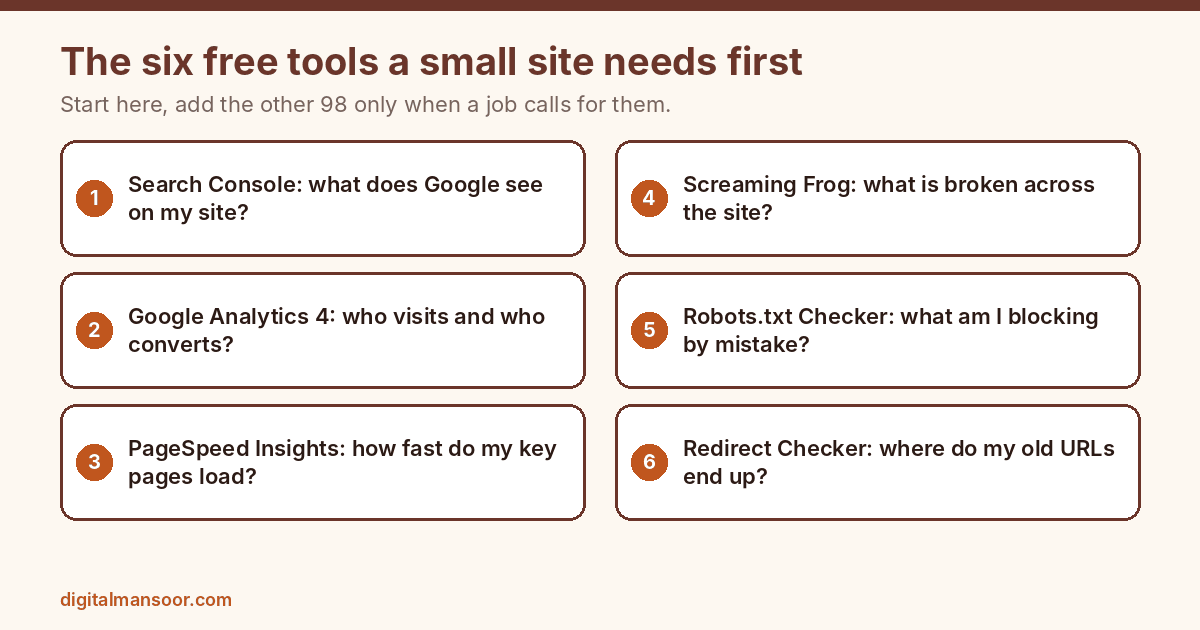
Quick answers
How many free SEO tools are on this list?
There are 104. I built 52 and host them on this site. The other 52 come from outside makers such as Google, Microsoft and Ahrefs.
Are free SEO tools enough for a small website?
For diagnosis, yes. Search Console, Analytics, PageSpeed Insights and a crawler cover most of what a small site needs. Paid platforms add larger datasets, history and scale, which matter more for big sites and agencies.
Which free SEO tool should I set up first?
Google Search Console. It shows your real queries, clicks and indexing status, and no other tool can match that first party data.
Do free SEO tools make a page rank?
No. A tool finds problems and saves time, and the ranking comes from pages that answer the search better than the alternatives. Treat scores from any tool as guides, not predictions.